DNS & BIND - Betrieb und Sicherheit (sys4)
1 Course Notes and exercises
This page contains the course notes and exercise instructions for attendees of the training DNS & BIND - Betrieb und Sicherheit (sys4).
URL: https://dns-security.dane.onl
Click on images to zoom in.
PDF Version: https://dns-security.dane.onl/training-dns-dnssec.pdf
1.1 Introduction
- What is your interest in DNS & DNSSEC?
- What is your prior knowledge of DNS & DNSSEC?
- What do you want to learn about DNS & DNSSEC?
2 New terminology used in DNS & BIND
- The terms
masterandslavehave been used to describe primary and secondary authoritative DNS servers in the past.- However this terminology is wrong and misleading, for reasons discussed in the Internet Draft Terminology, Power, and Inclusive Language in Internet-Drafts and RFCs: https://tools.ietf.org/html/draft-knodel-terminology
- in this document, and in configuration examples, we are using the
new terms
primary(instead ofmaster) andsecondary(instead ofslave) whenever possible. - BIND 9 has started adopting the new terms with BIND 9.14, however
the transition is not complete, and some terms in configuration
statements still use the old terms. This will change with
future releases
- if you use an older version of BIND 9, please substitute the new terms for the older ones
- the old terminology will also be found in older books and standards documents (RFCs and Internet Drafts)
- DNS terminology can be confusing and is sometimes overloaded. RFC 9499 DNS terminology ( https://tools.ietf.org/html/rfc9499 ) tries to collect and document the current usage of DNS terminology.
3 DNS 1x1
3.1 DNS - The Domain Name System
DNS is like chess
the rules are simple
but the chances to loose the game
are endless
3.2 DNS - The Domain Name System
- First developments 1981-1983
- Introduced into the Internet between 1983 and 1988
- Replacement for the static
hosts.txtfile - Continuously updated and expanded
- Scales with the growth of the Internet
- Minimal built-in security
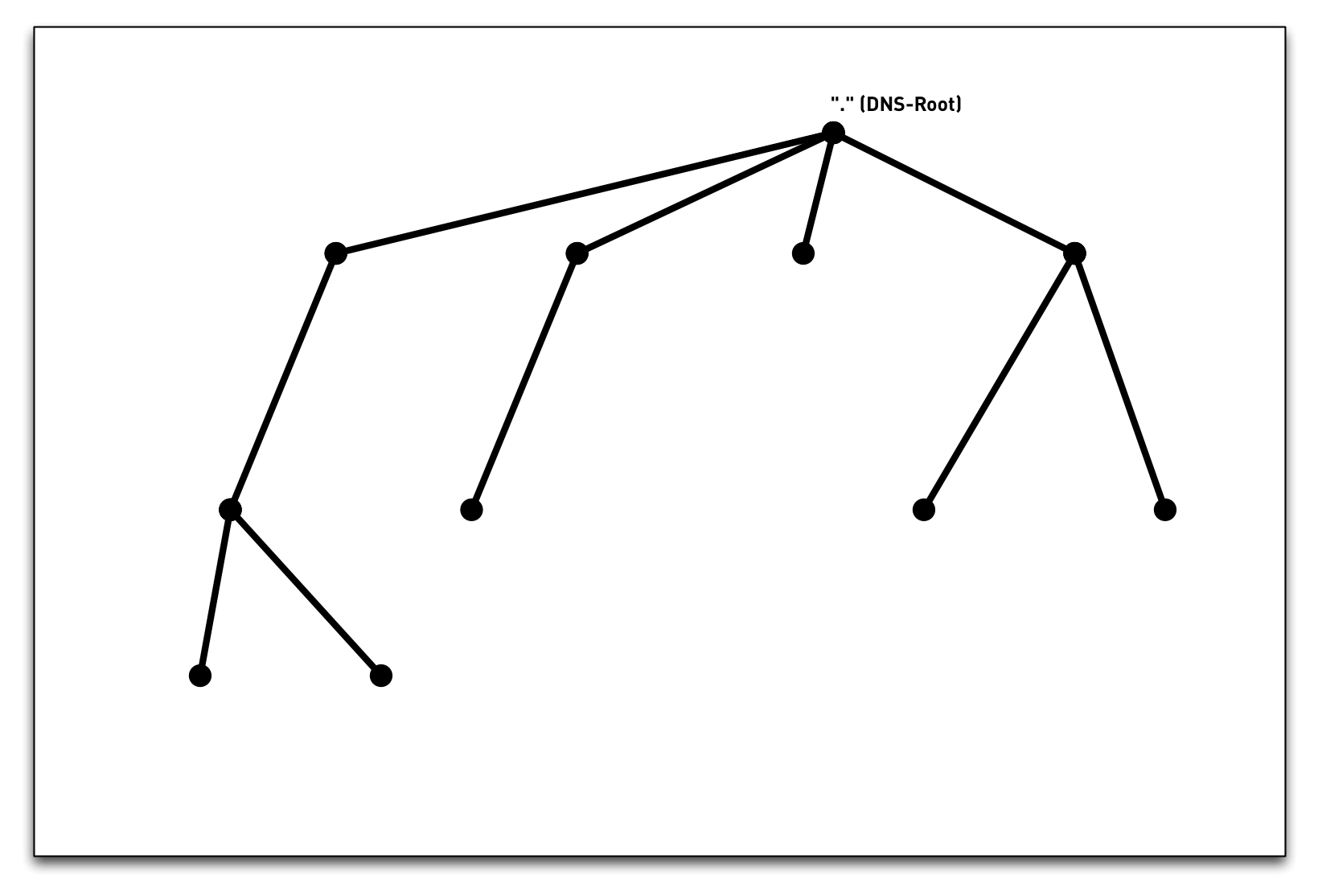
3.3 DNS namespace
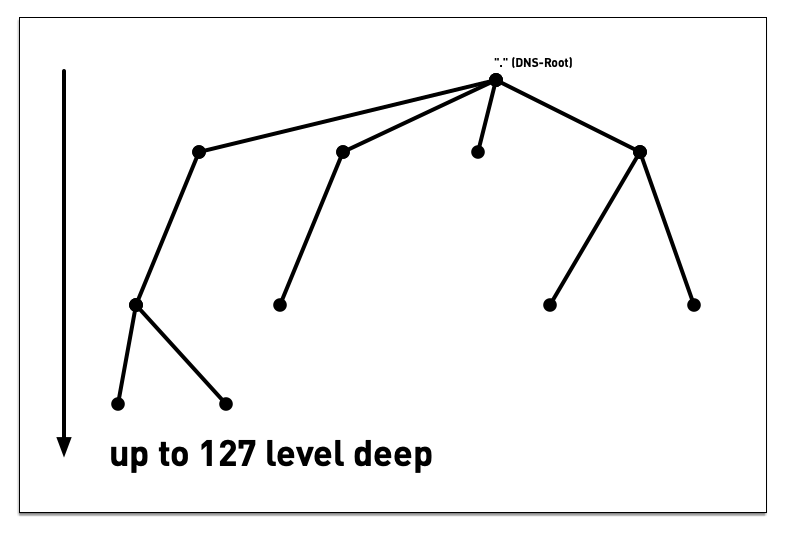
3.4 DNS namespace
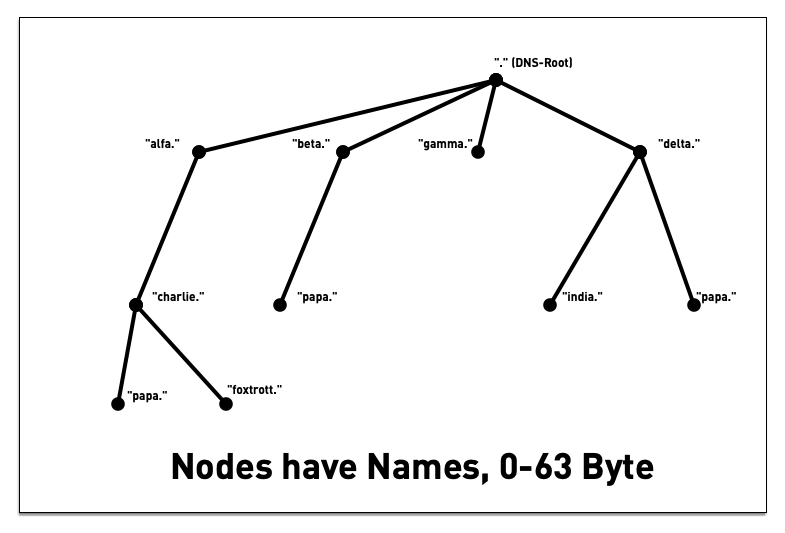
3.5 DNS namespace - "Label"
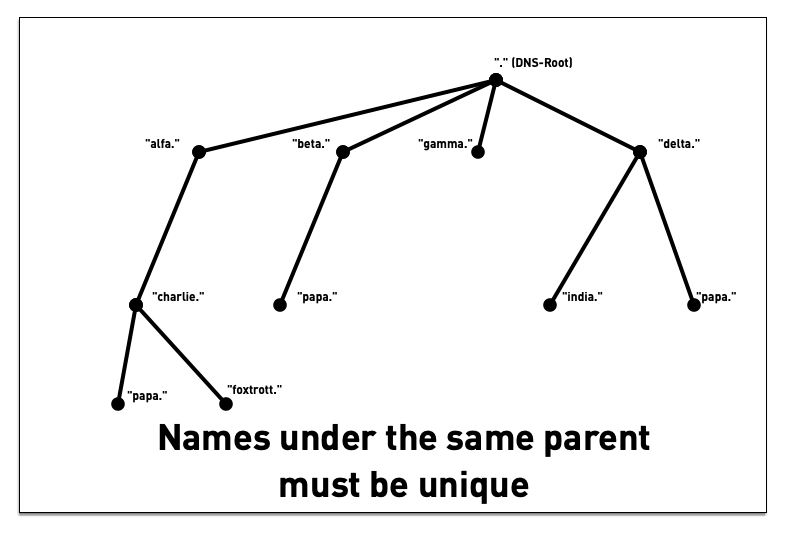
3.6 DNS namespace - "Label"
3.7 DNS namespace - "Label"
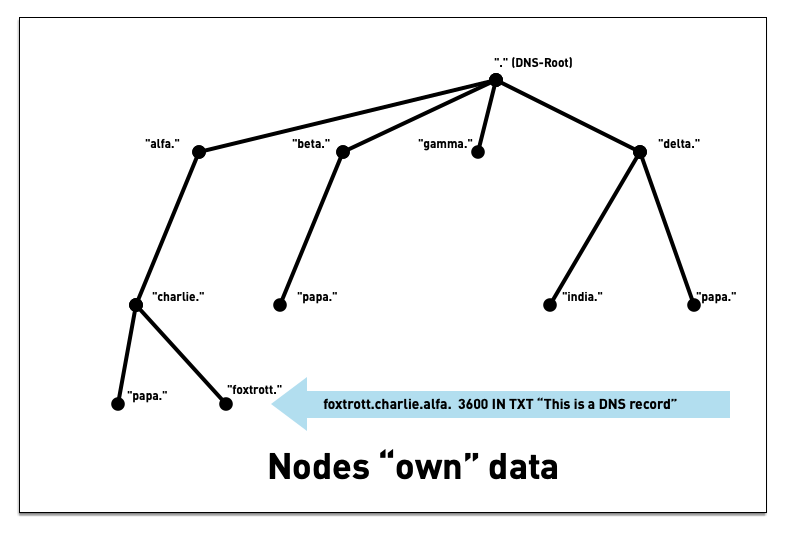
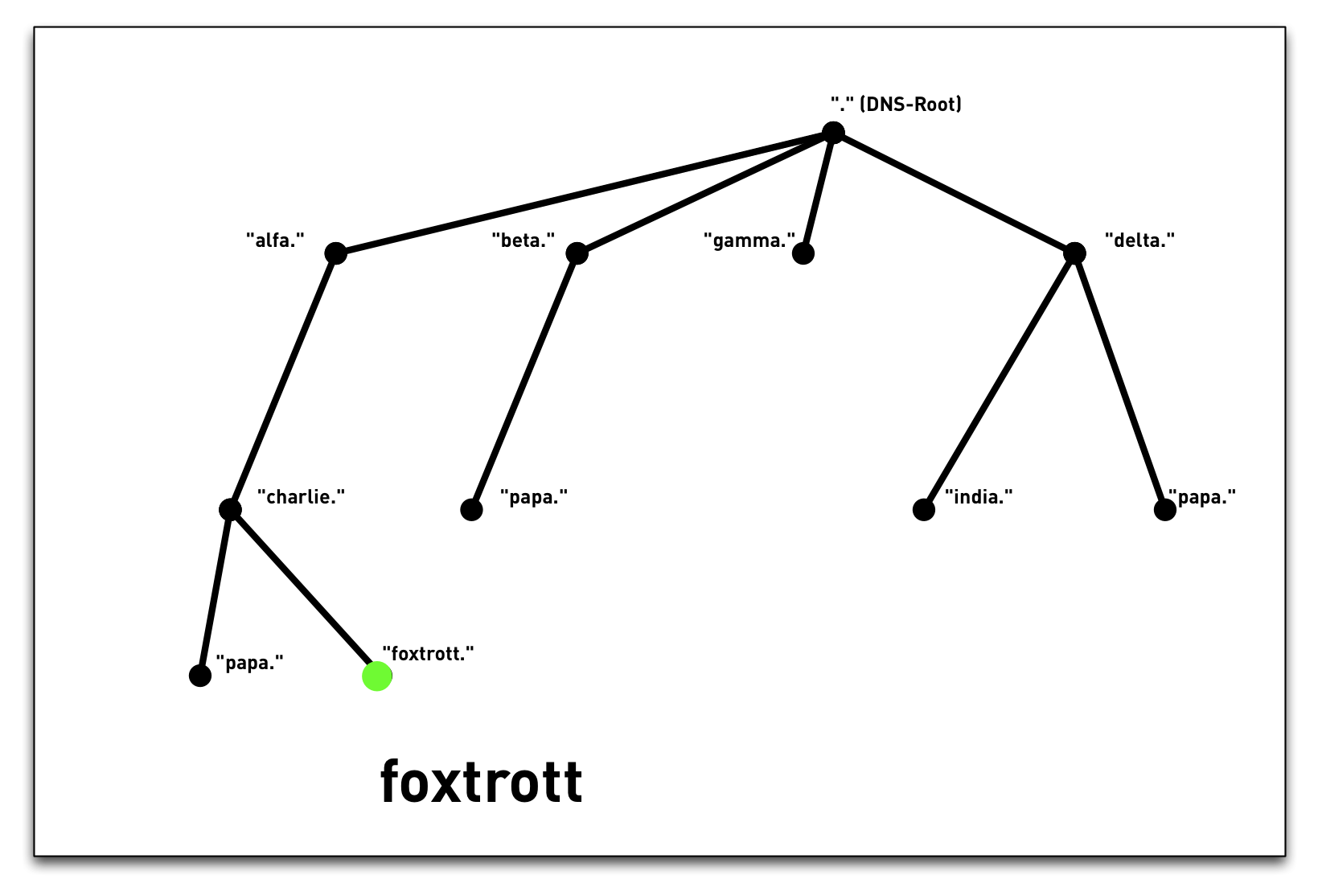
3.8 DNS namespace
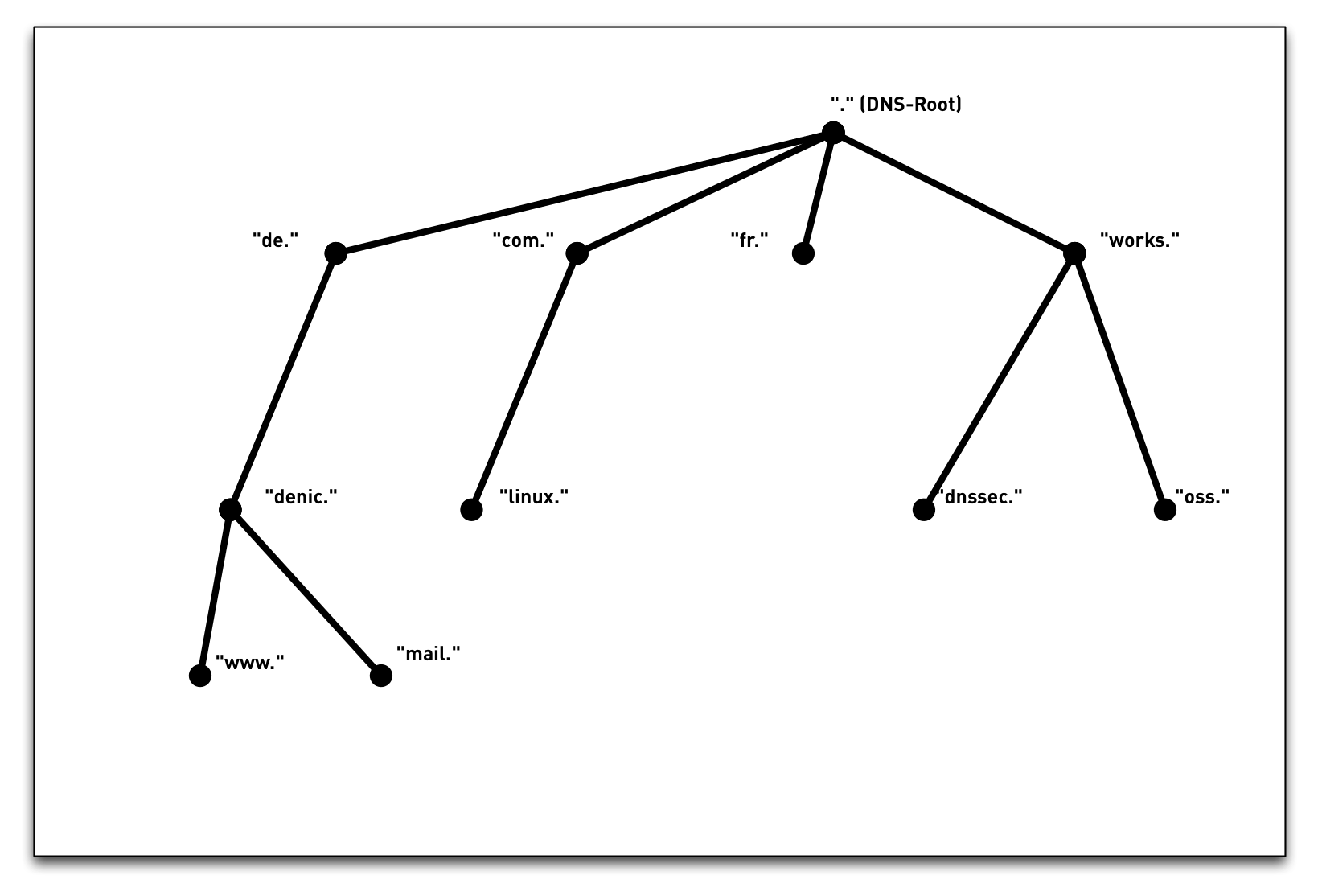
3.9 Internet namespace
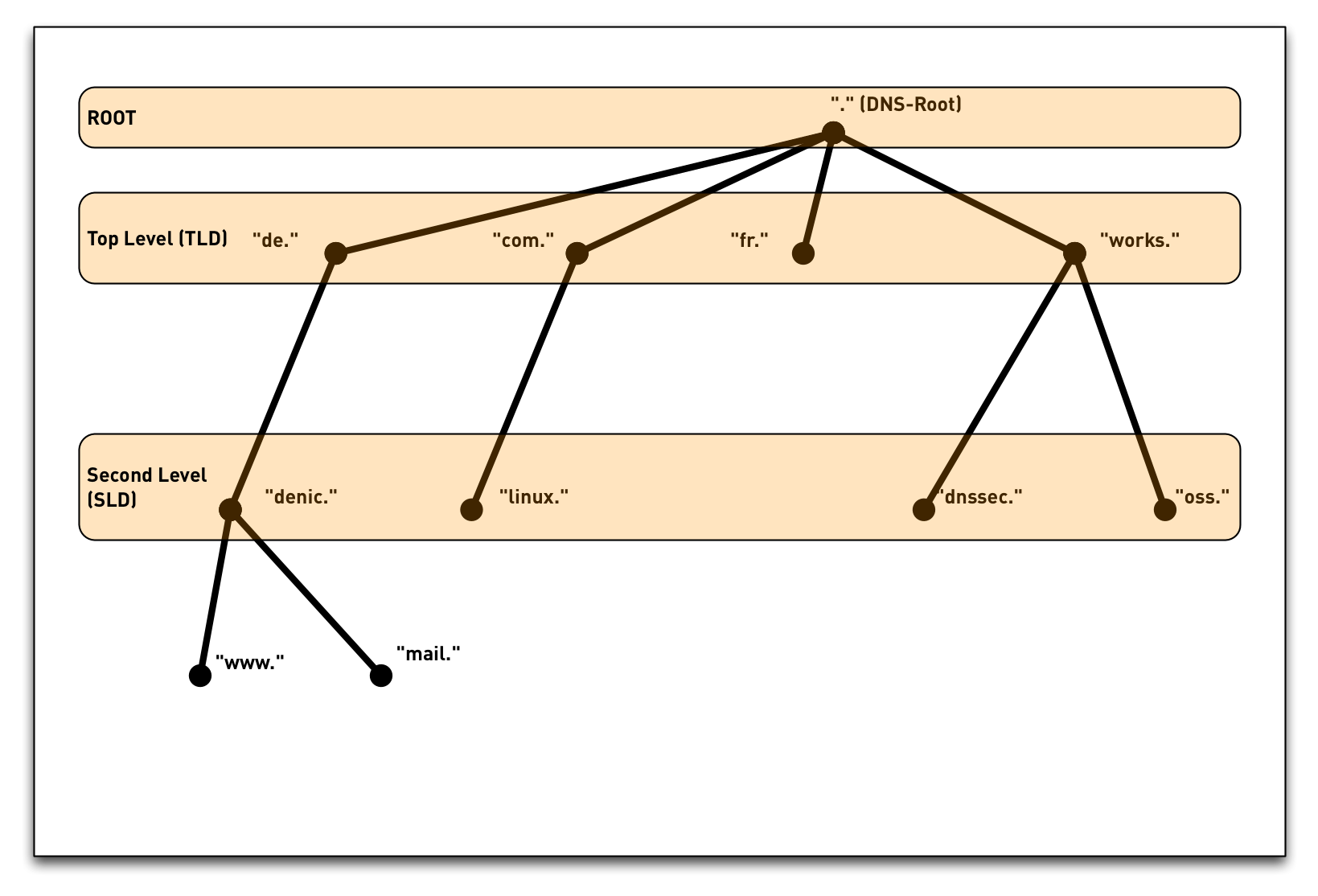
3.10 Internet namespace
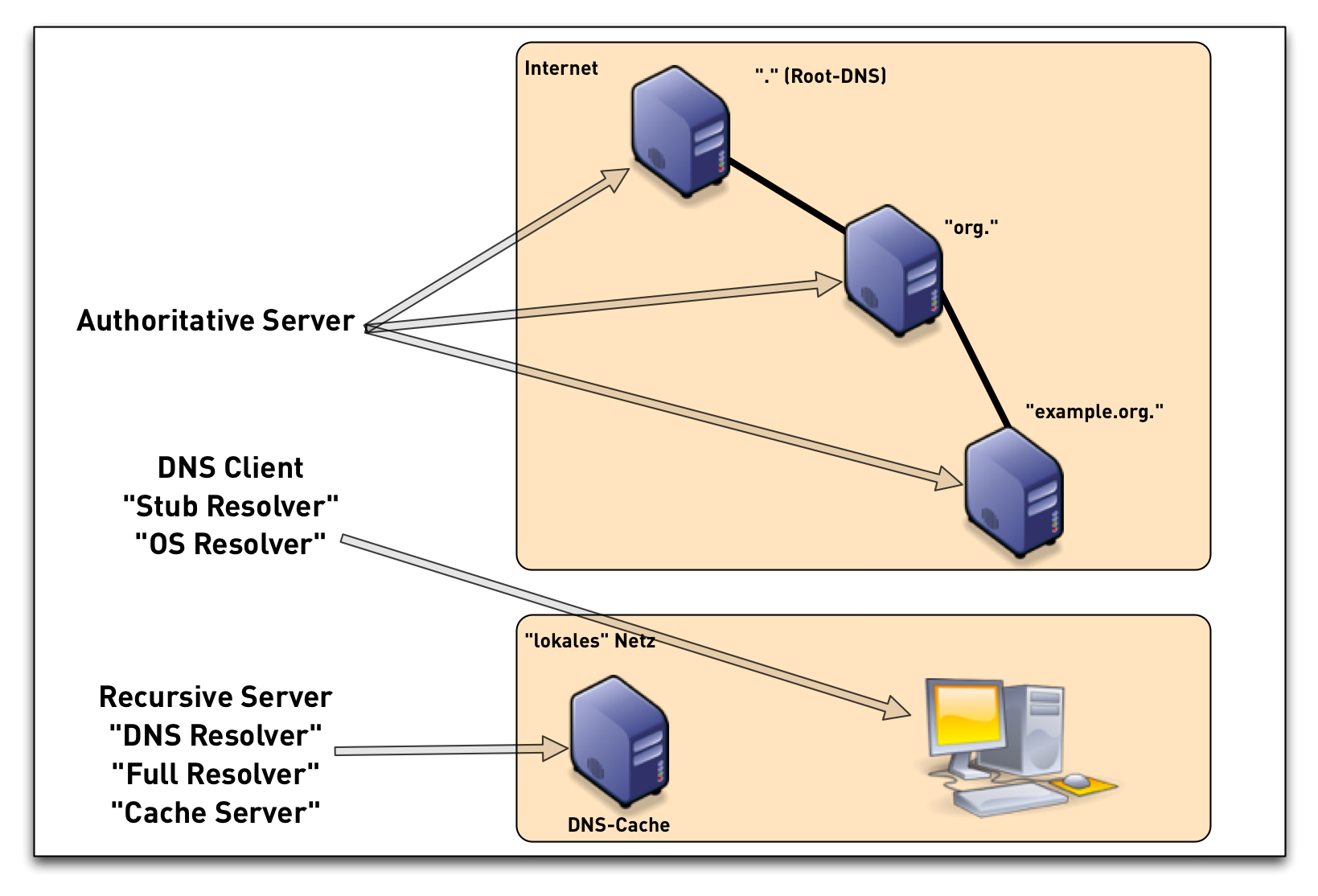
3.11 DNS components
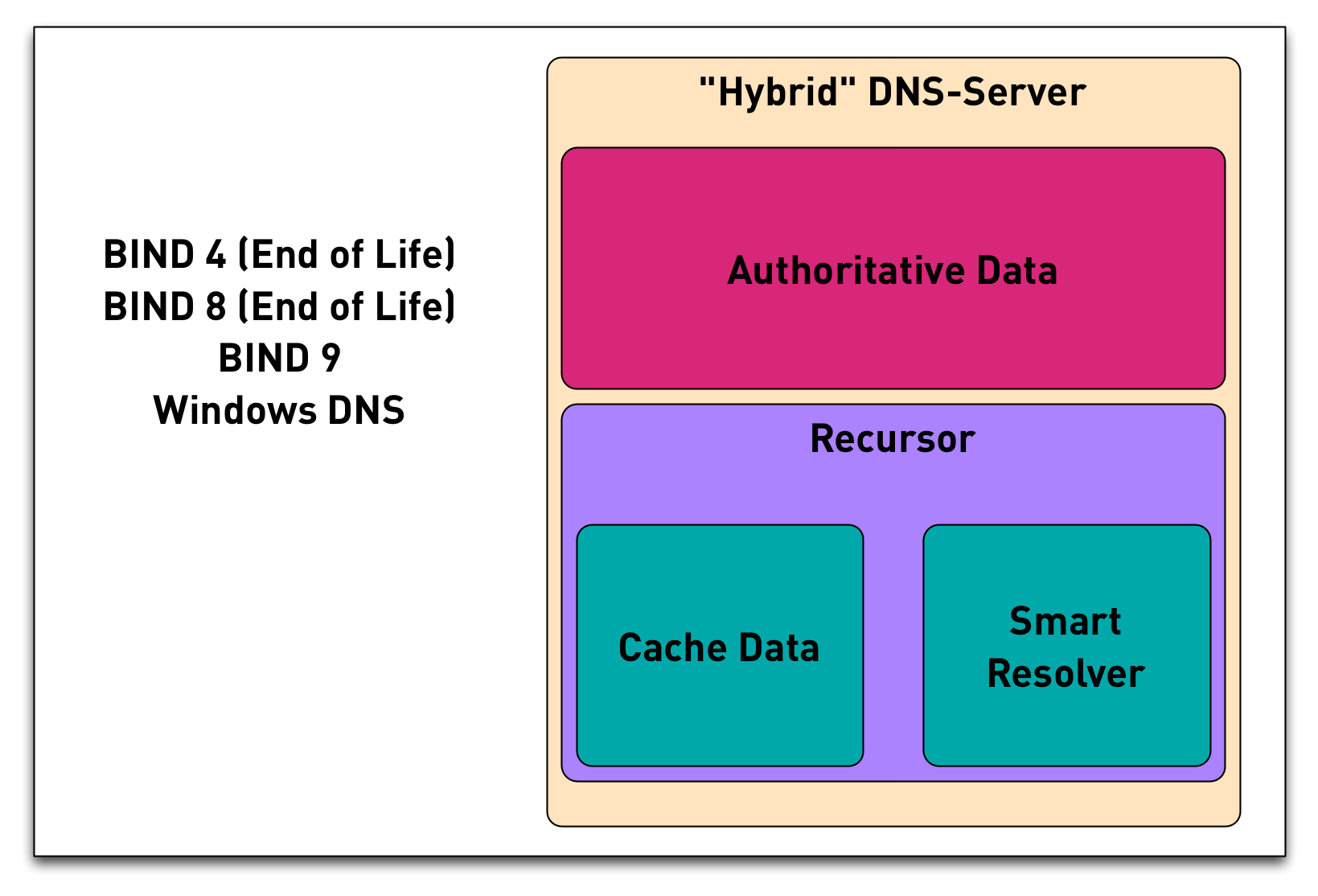
3.12 DNS components - Hybrid-DNS
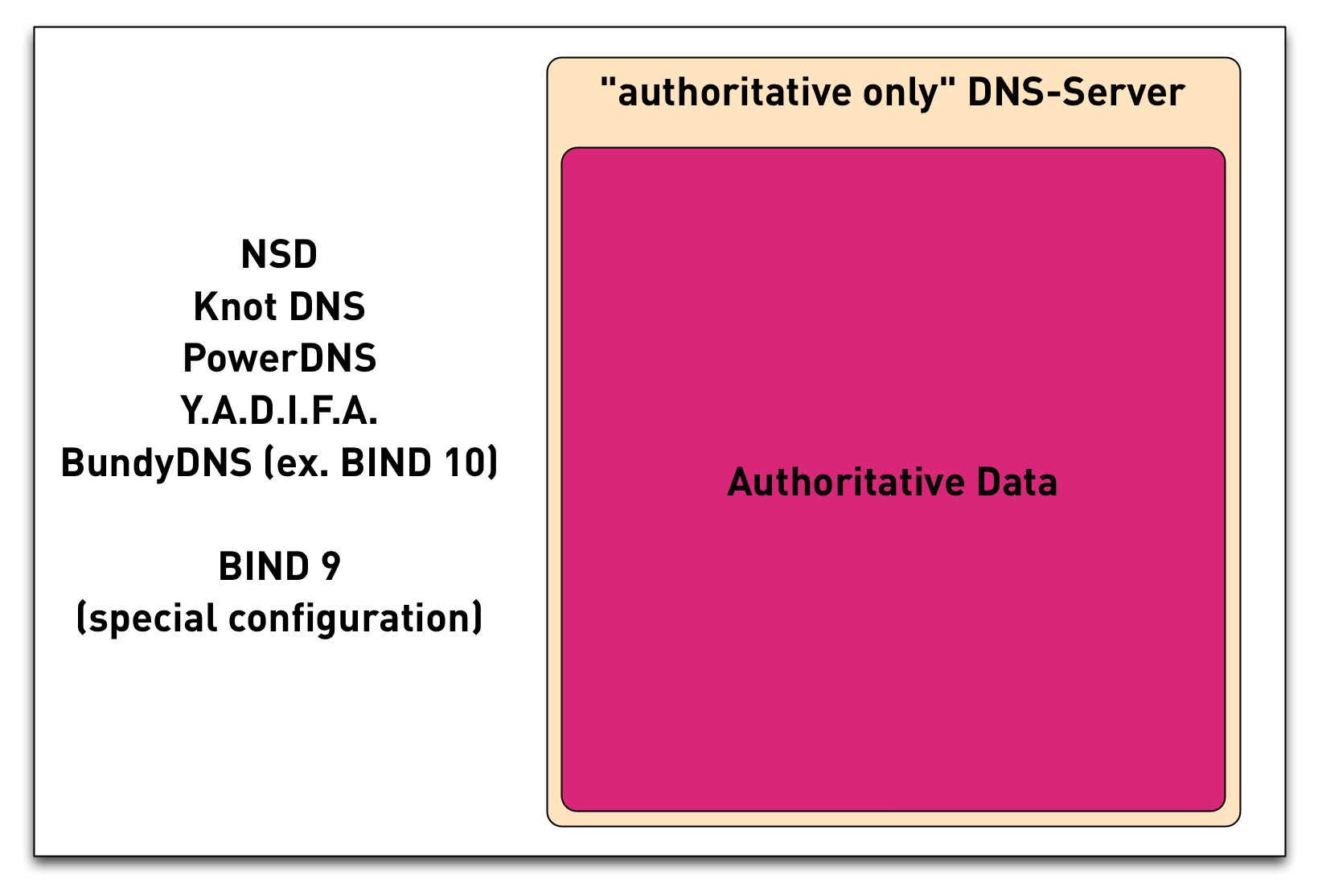
3.13 DNS components - Authoritative Only
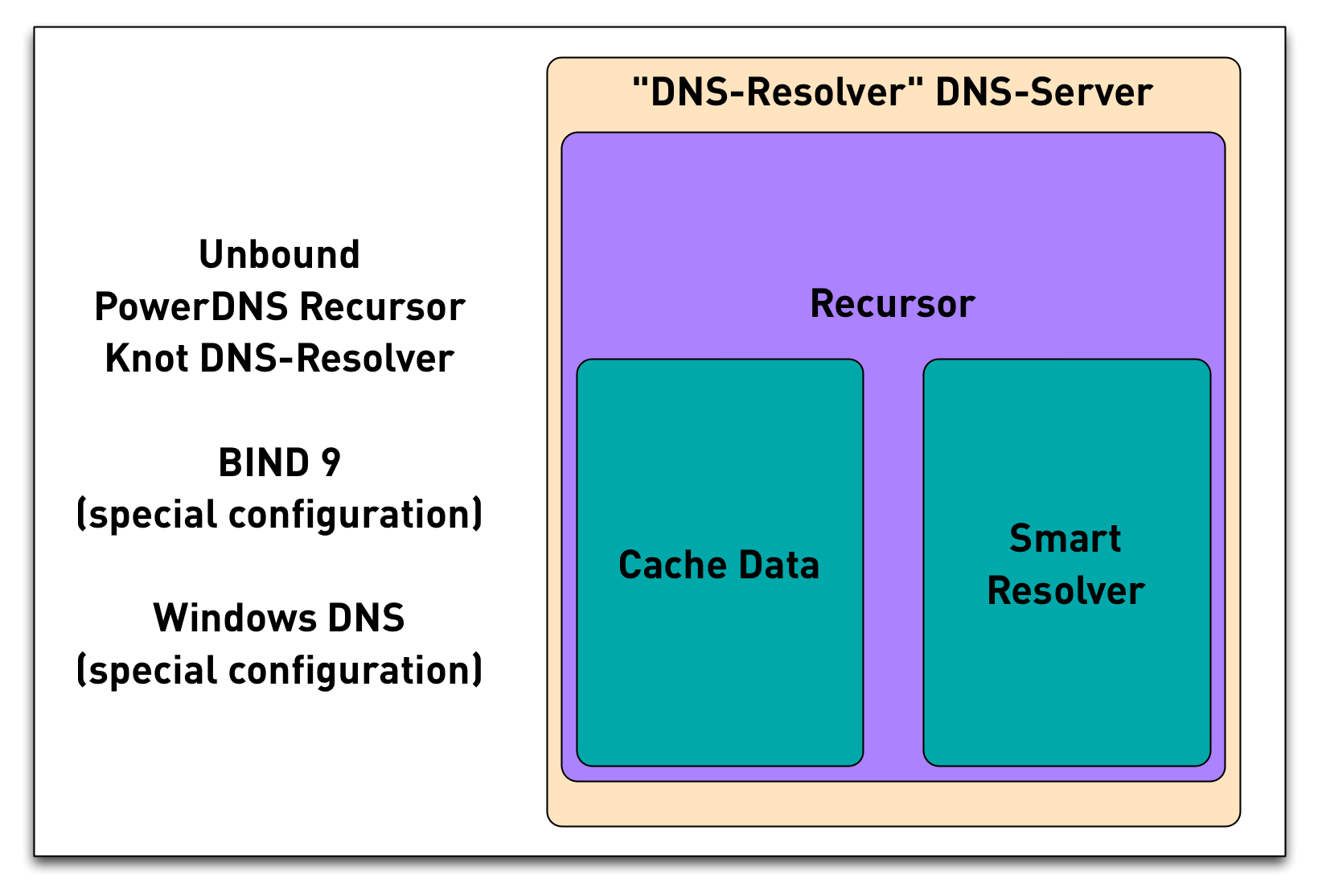
3.14 DNS components - DNS Resolver
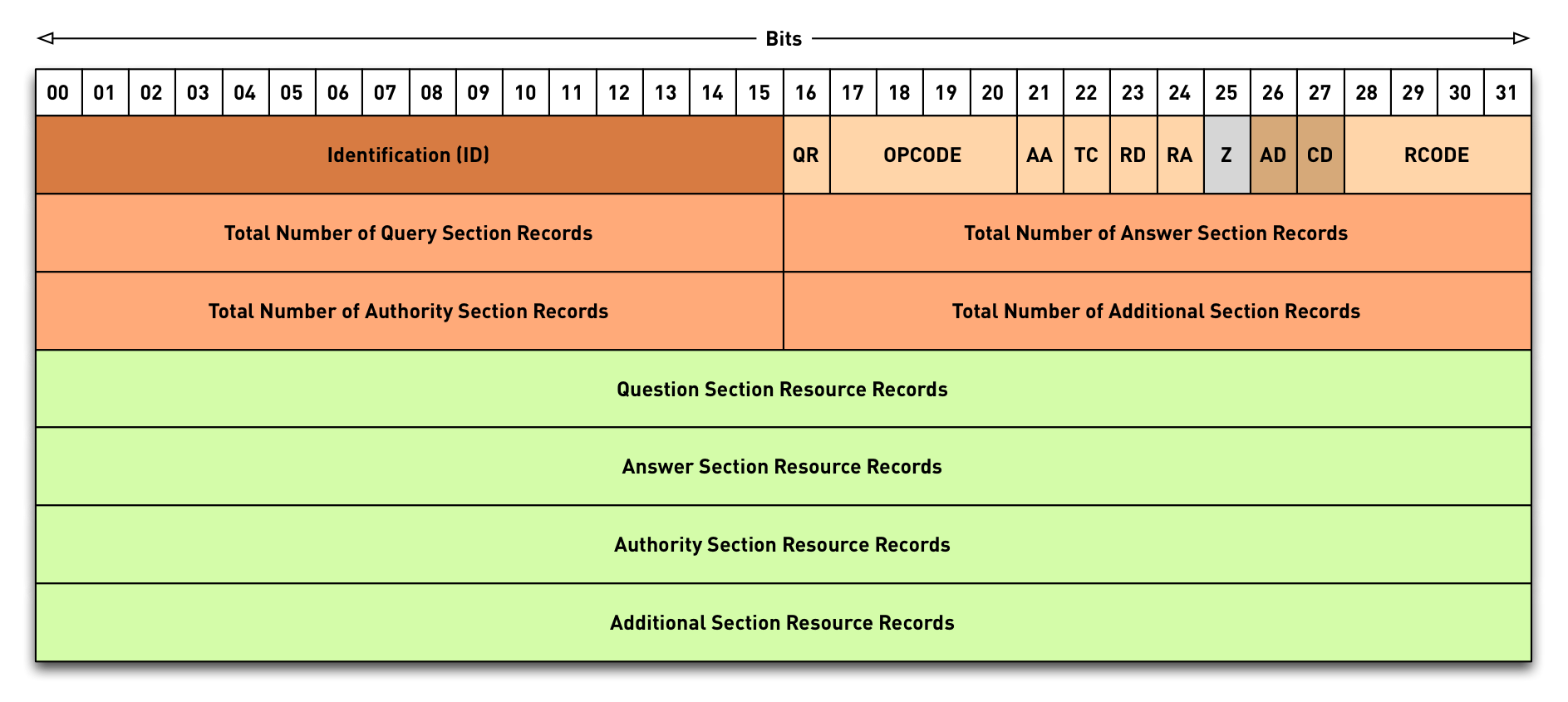
3.15 DNS message format
3.16 DNS Resource Records
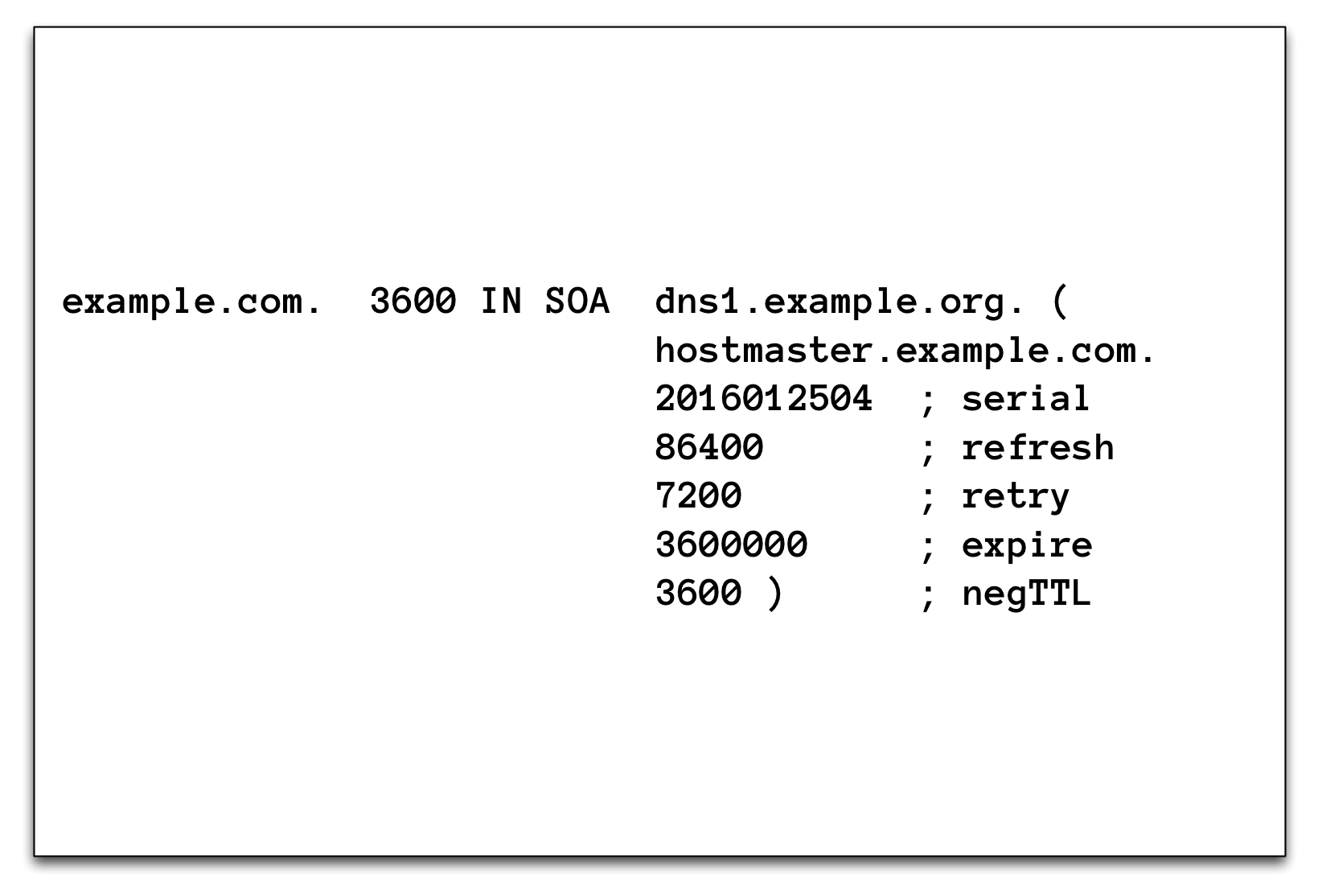
3.16.1 SOA Record
3.16.2 Negative Caching
- The last value of the SOA record (together with the TTL-value of the SOA record, the lowest value will be used) controls how long negative DNS responses are stored in a DNS cache
- Negative responses are NXDOMAIN and NXRRSET/NODATA
- Error-Responses (FORMERR, REFUSED …) will not be cached
- SERVFAIL is cached for
servfail-ttlseconds (default 1, maximum is capped to 30)
3.16.3 NS record
3.16.4 NS record
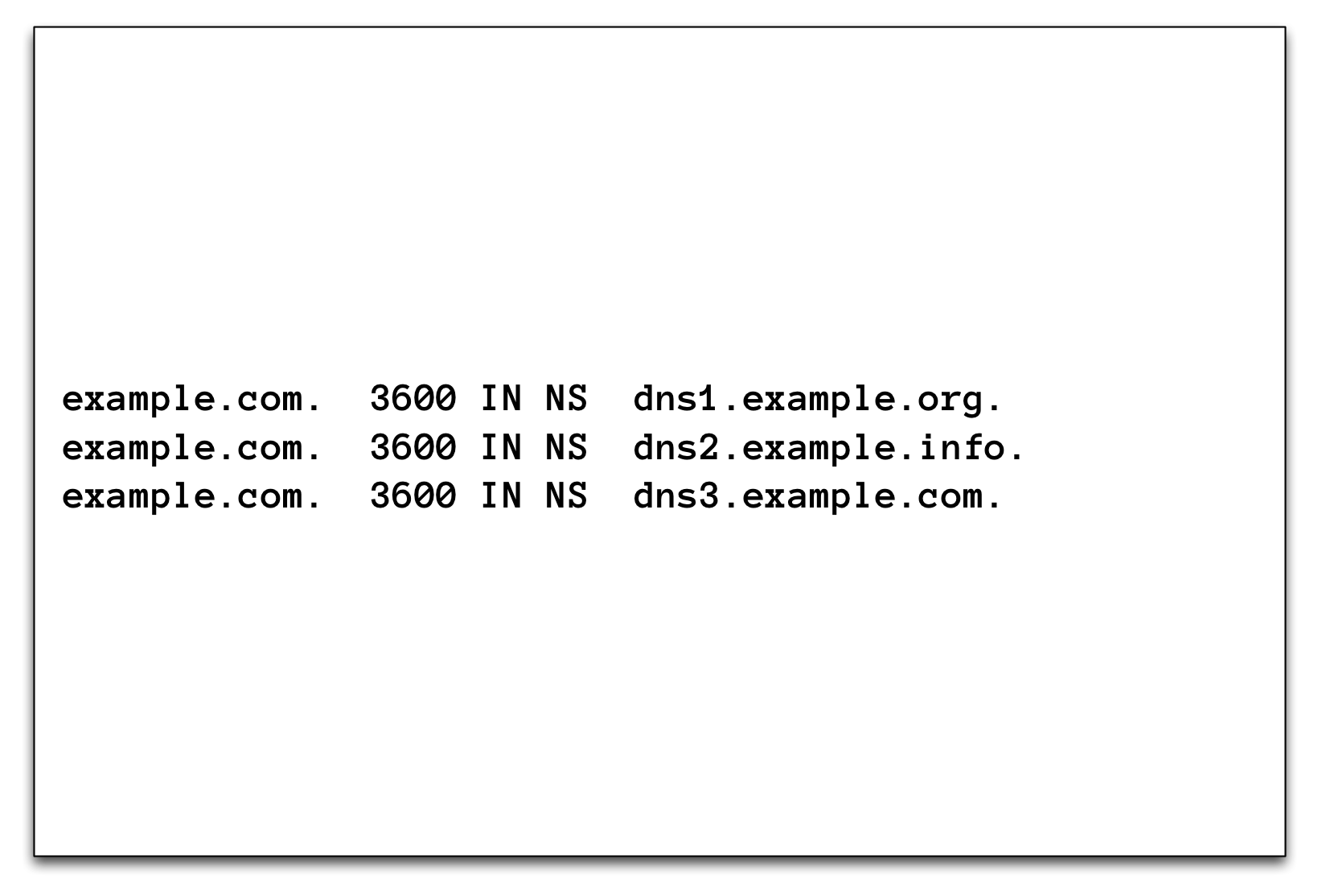
- NS records create the DNS delegation
- The NS record in the parent zone (delegation) SHOULD always match the NS records in the (delegated) zone (see When parents and children disagree)
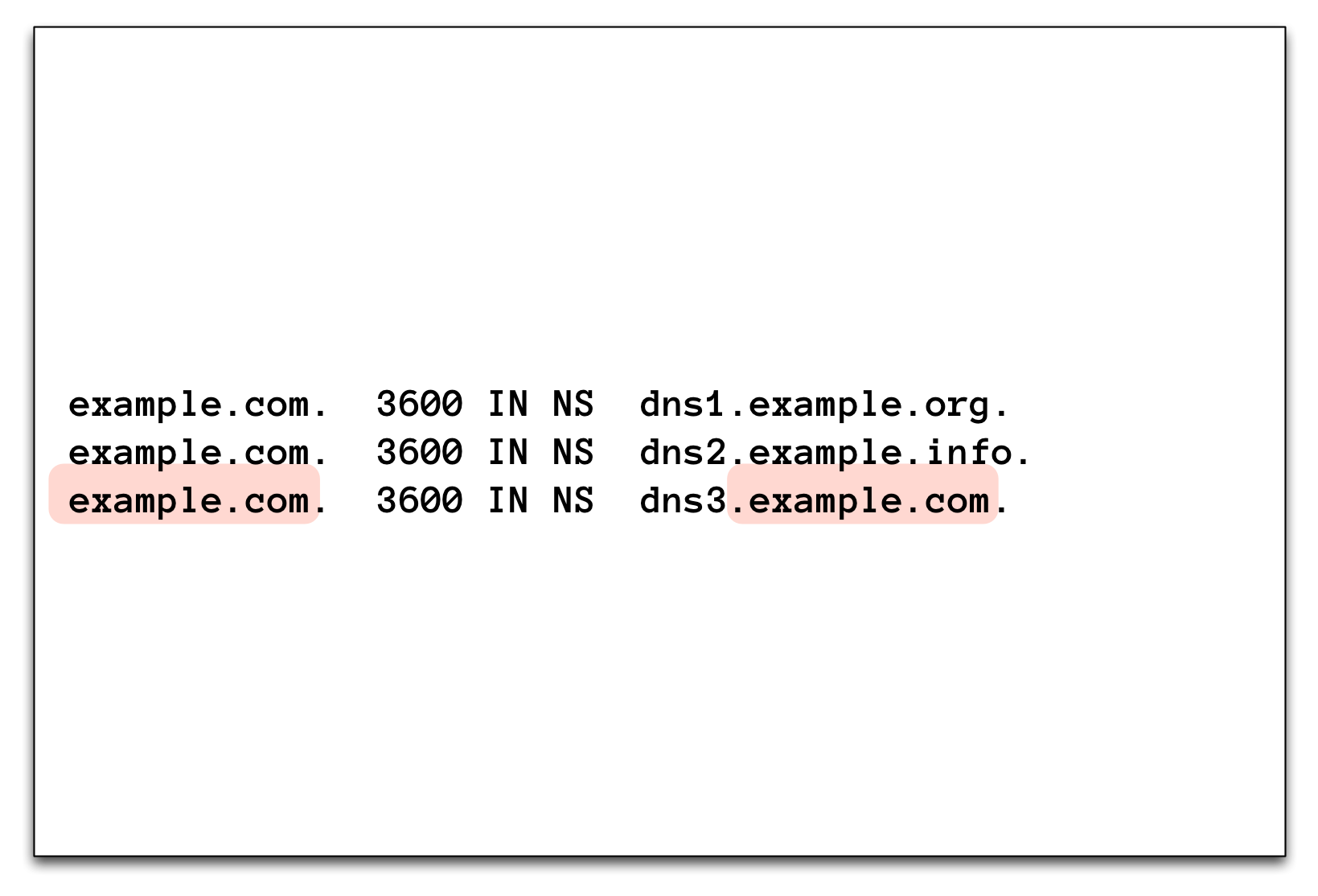
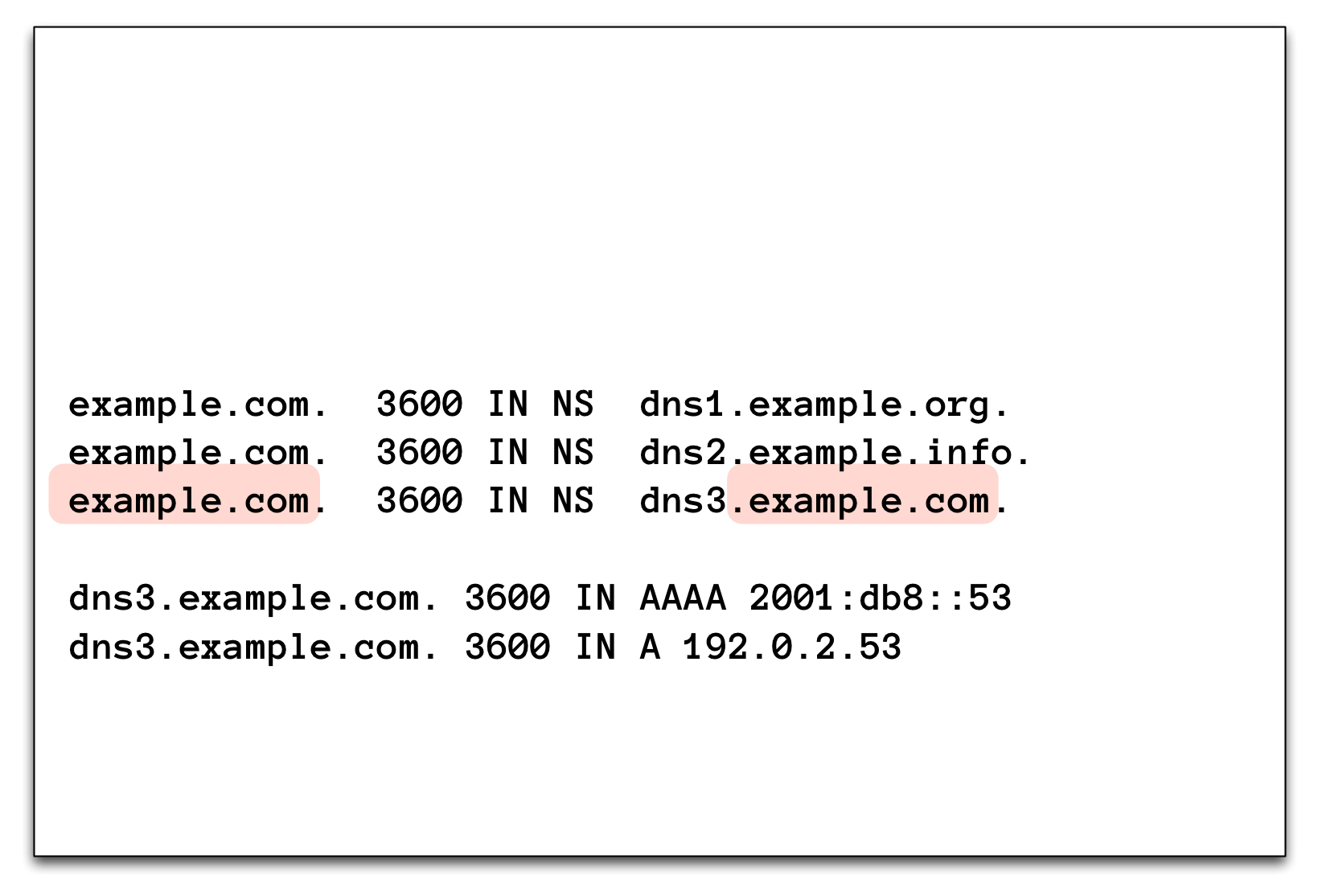
- Is the domain name of the authoritative DNS servers for a zone inside the delegated domain, the parent zone must be augmented with "Glue" records (A/AAAA records of the authoritative DNS Servers) to make the delegation work
3.16.5 Glue (1)
3.16.6 Glue (2)
4 Building and maintaining a DNS Resolver
4.1 Building a validating DNS Resolver
- Work on the
dnsrNNvirtual machine (DNS resolver server) - Obtain root privileges
$ sudo -s
- Install BIND 9
% dnf install bind
- Enable and start BIND 9
% systemctl enable --now named
- Check that BIND 9 is running without errors
% rndc status
% systemctl status named
- Try if our BIND 9 works as a DNS resolver
$ dig @localhost sys4.de
4.2 Optimizations to the default configuration
- Work on the
dnsrNNvirtual machine (DNS resolver server) - Let's tweak the configuration file
/etc/named.conffor a resolver DNS server. Add the following new lines in theoptionsblock in the/etc/named.conffile:options { [...] dnssec-validation auto; server-id none; version none; hostname none; recursive-clients 32768; tcp-clients 1024; max-clients-per-query 1024; fetches-per-zone 2048; fetches-per-server 4096; edns-udp-size 1232; max-udp-size 1232; minimal-responses yes; querylog no; max-cache-size 2147483648; }; - The values above are for an ISP level DNS resolver. They should work for a broad range of DNS resolver machines, from small to very large.
- The new configuration statements:
dnssec-validation auto;enables DNSSEC validation via the built in trust anchor for the Internet Root-Zone. If DNSSEC is used in an closed private DNS system (not connected to the Internet), dedicated DNSSEC trust anchor must be configured.- server-id none: disable returning the server's hostname on the
query
dig @ip-of-server ch TXT hostname.bind - version none: disable returning the BIND 9 version number on
the query
dig @ip-of-server ch TXT version.bind - recursive-clients: number of concurrent DNS queries over UDP that are allowed from clients
- tcp-clients: number of concurrent DNS queries over TCP that are allowed from clients
- max-clients-per-query 1024: rate-limiting - number of concurrent clients that can request the same query
- fetches-per-zone: rate-limiting - maximum number of concurrent DNS queries inside one zone
- fetches-per-server: rate-limiting - maximum number of concurrent DNS queries towards one authoritative DNS server
- edns-udp-size: maximum UDP answer size requested from authoritative servers
- max-udp-size: maximum UDP answer size when sending answers to clients
- minimal-responses yes: only fill the authority and additional sections when necessary by the DNS protocol
- querylog no: disable query logging on start/restart even if configured. Query logging slows down the DNS resolver
- max-cache-size 2147483648: use a maximum of 2GB for the DNS cache. A larger cache often has a negative impact on the DNS resolvers performance. If unsure, test with a performance benchmark.
- Check the configuration with
named-checkconfand reload the BIND 9 configuration withrndc reconfig - Make sure that the DNS resolver still does resolve DNS names in the Internet
5 BIND 9 repositories for up-to-date BIND 9 versions
6 A quick look at DNSSEC
6.1 DNS Security (or lack of)
- the classic DNS from 1983 has not been designed with security in mind
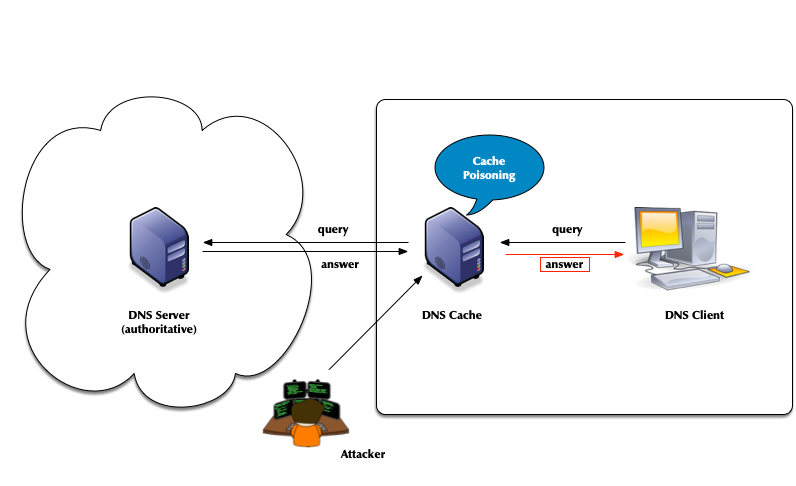
- Attack vector: DNS cache poisoning
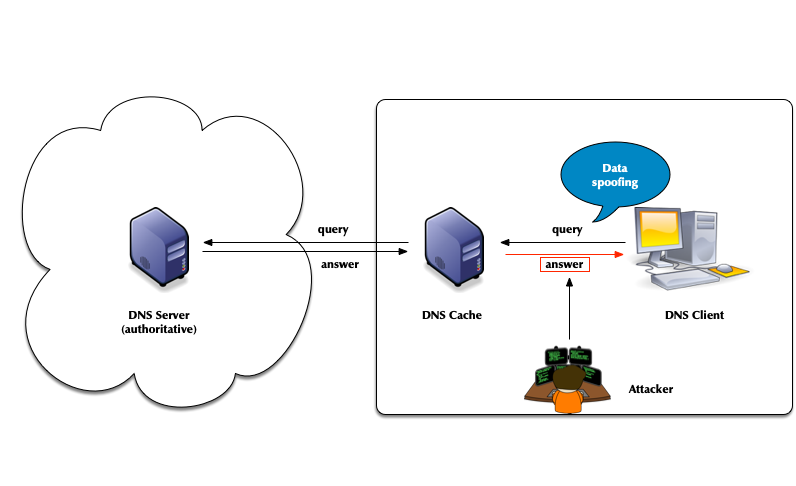
- Attack vector: Men-in-the-Middle data spoofing
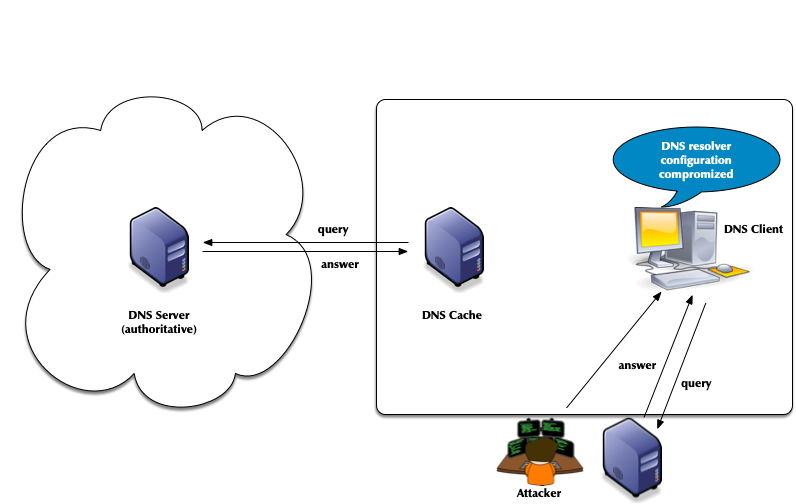
- Attack vector: changes to the client DNS resolver configuration
- Attacks of authoritative DNS servers
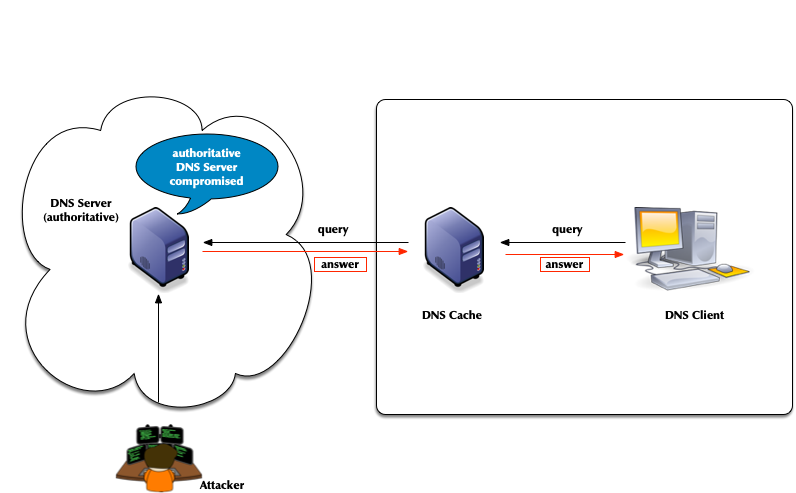
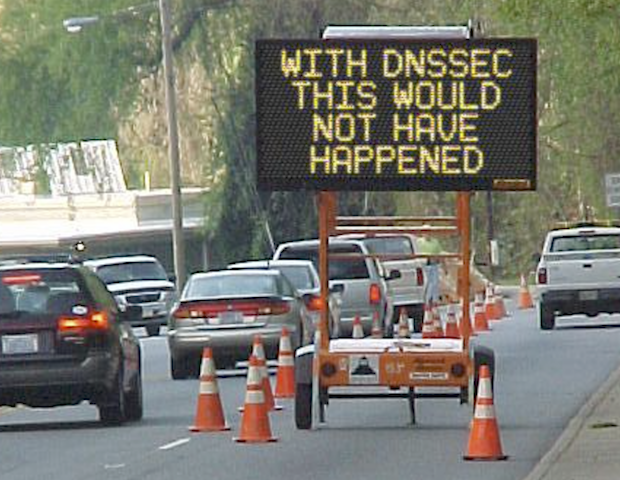
- DNSSEC can help
6.2 DNSSEC
- The DNS security extension DNSSEC secures DNS data by augmenting
the data with cryptographic signatures
- The owner (administrator) creates a pair of private and public keys for each DNS zone (asymmetric crypto)
- The owner/administrator signs all DNS data with the private/secret key
- The recipient of the data (DNS resolver or client operating
system or application) will verify (validate) the data
- That the data has not been changed on the server nor during transit
- That the data comes from the owner (the owner of the private key)
6.3 The chain of trust in DNS
- DNSSEC creates a chain of trust between the parent zone and the child zone
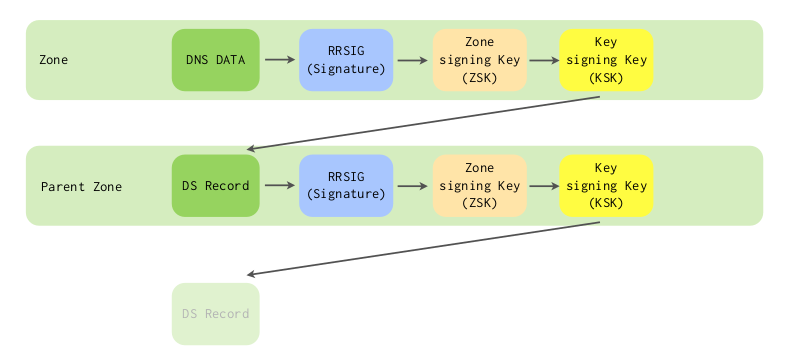
- Applications and DNS resolvers can follow the chain of trust to a configured trust anchor to validate the DNS data
- We will look into DNSSEC in more details later in this course
7 Cryptography in DNS (short)
7.1 Cryptography for DNS Admins
- Cryptography has four purposes:
- Confidentiality – keeping data secret
- Integrity – Is it "as sent"?
- Authentication – Did it come from the right place?
- Non-Repudiation – Don’t tell me you didn't say that.
- DNSSEC implements: Authentication & Integrity
- The IETF has added confidentiality since 2016:
- DNS uses different authenticity and integrity techniques depending on the application.
- Symmetric Cryptography
- Message Digests (aka: hashes, hash values, fingerprints)
- Message Authentication Codes
- Asymmetric Cryptography
- Digital Signatures
7.2 Symmetric Cryptography
- Symmetric cryptography provides both integrity and authenticity.
- A single key is stored and used by both (all) parties.
- The key encrypts and decrypts.
- The key is a shared secret.
- The system is known as pre-shared key (PSK).
- Securely getting the key to all parties can be a challenge.
- Symmetric cryptography requires mutual trust.
- "My security is good, but what about the other person's?"
- If all sides are administered by one party, trust is a non-issue.
- For DNS, Pre-Shared-Keys (PSK) work well:
- between primary and secondary servers (TSIG).
- for dynamic DNS updates (TSIG).
- for controlling BIND 9 with
rndc(TSIG).
- For DNS, PSKs do not work well:
- between DNS Resolver servers and authoritative DNS servers (DNSSEC).
- between stub resolver & DNS Resolver servers (DNSSEC amongst other).
7.2.1 Confidentiality: Not the Goal
- A Pre-Shared Key (PSK) could be used to encrypt a message.
- If it decrypts, confidentially, integrity, and authenticity are assured.
- However, confidentiality was not a design goal (of DNSSEC).
- Encrypting everything is computationally expensive.
- The alternative is more complicated but less expensive.
7.2.2 Message Digest
- Creating a hash of the message is a light-weight alternative to
encrypting everything.
- A hash is also known as a hash value, a message digest (MD) or a fingerprint.
- The sender runs a cryptographic hashing algorithm on the message to
produce a fixed-length hash.
- The message and hash are sent over an insecure path.
- As the sender did, the receiver hashes the message.
- If the hashes match, the message was not modified. Message integrity is proven.
- However, the receiver does not know if the message and hash were both replaced: Message authenticity is unknown.
- Confidentiality is not provided.
7.2.3 Message Authentication Codes
- Hashing, with a symmetric key added to the input, efficiently
provides integrity and authenticity.
- There is no confidentiality.
- A MAC is a fingerprint (MD, hash) created with the message and a PSK as input.
- The MAC described here, is a keyed HMAC (Hash-based message
authentication code).
- It is used by DNS.
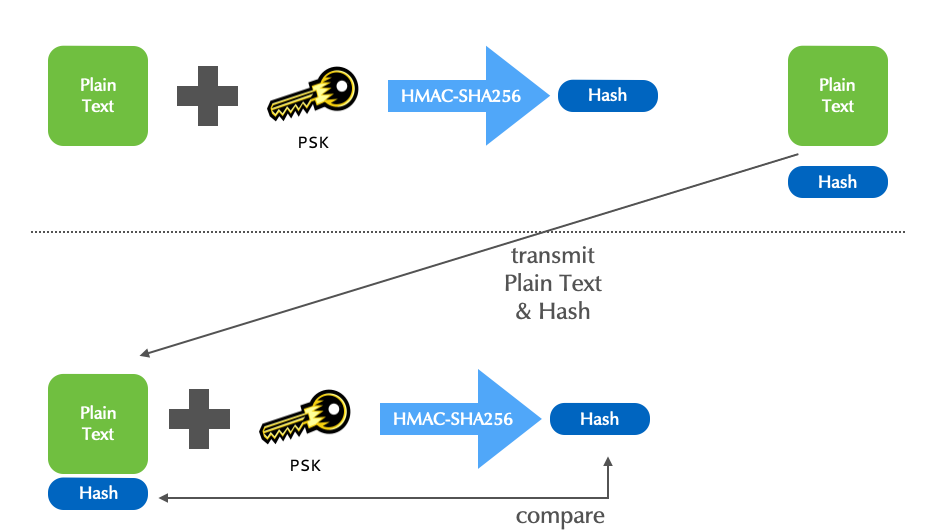
- Although HMACs efficiently assure both the sender's authenticity,
and the message's integrity, not all applications can use
(pre)shared keys.
- "Am I really seeing the website
mybank.example?" - "Is the email I'm reading really from Edward Snowden?"
- "Is this RRSet actually for
theguardian.com?"
- "Am I really seeing the website
7.3 Asymmetric Cryptography
- In DNS, asymmetric cryptography is used for DNSSEC.
- This asymmetric cryptography section is a short overview.
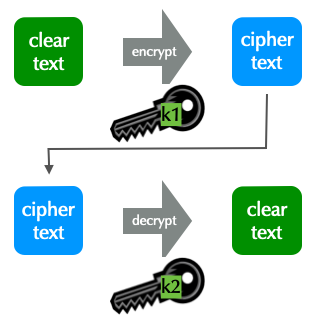
- Asymmetric cryptography uses two keys, a pair.
- Data encrypted with one key can only be decrypted by the other.
- A key cannot decrypt what it encrypted!
- One key of a pair is declared as public, the other as private.
- The private key is highly sensitive, never shared, and must be well protected.
- The public key is made widely available without concern for who knows it.
- The technique is known as public key encryption.
7.3.1 Two Applications for public key (PK) Encryption
- PK encryption is used for privacy, to assure only the intended
receiver can read a message.
- Data integrity is also assured.
- Used in DNS-over-TLS and DNS-over-HTTPS
- PK encryption is used for authenticity, assuring the recipient,
that the message came from a specific sender.
- This is known as signing a message.
- Data integrity is also assured.
- Used in DNSSEC, as well in DNS-over-TLS and DNS-over-HTTPS
7.3.2 PK Application 2: Encryption for Authenticity
- To assure authenticity, a sender encrypts a message with her
private key.
- Anyone decrypting the message with the public key is assured it came from the holder of the private key.
- The message is encrypted, but there is no privacy.
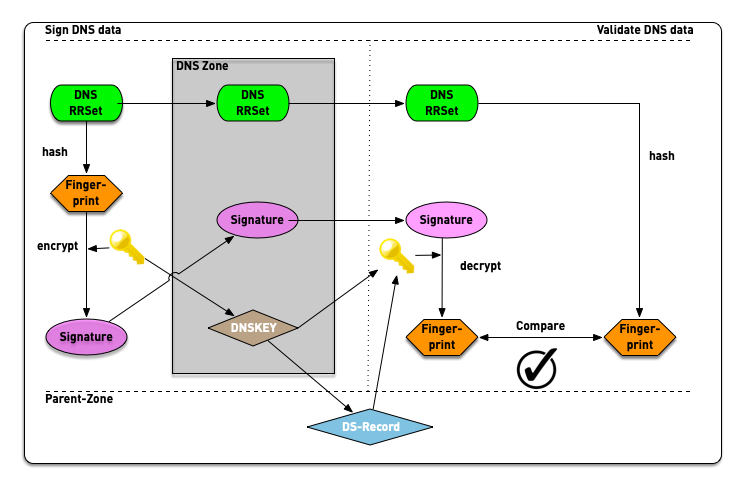
7.3.3 PK Application 2: Encryption for Authenticity: Digital Signatures
- For efficiency, the message itself is not encrypted.
- The message is first hashed to create a fingerprint.
- The fingerprint is encrypted.
- The signed fingerprint is a digital signature (aka encrypted fingerprint and encrypted hash).
7.3.4 Digital Signatures in DNSSEC
7.4 DNSSEC
- The DNS Security Extensions, described in RFC 2065 (old DNSSEC), allow a zone administrator to digitally sign zone data
- The base DNSSEC RFCs:
- RFC 4033 to 4035 - Updates DNSSEC to DNSSECbis, published March 2005:
- RFC 4033 - DNS Security Introduction and Requirements
- RFC 4034 - Resource Records for the DNS Security Extensions
- RFC 4035 - Protocol Modifications for the DNS Security Extensions
- The DNS security extension DNSSEC secures DNS data by augmenting
the data with cryptographic signatures
- The owner (administrator) creates a pair of private and secret keys for each DNS zone (asymmetric crypto)
- The owner/administrator signs all DNS data with the private/secret key
- The recipient of the data (DNS resolver or client operating
system or application) will verify (validate) the data
- That the data has not been changed on the server nor during transit
- That the data comes from the owner (the owner of the private key)
- DNSSEC signs data to guarantee authenticity and integrity.
- It assures a client that a RRSet is from the proper authoritative sever and has not changed.
- DNSSEC does not encrypt data to provide privacy.
- Anyone can find out the RRSets you request.
- DNS Servers that support DNSSEC
- BIND 9: Authoritative server and validating resolver
- NSD from NLnet Labs: Fast authoritative server
- Unbound from NLnet Labs :Fast and secure validating resolver
- Windows DNS Server: Authoritative server and validating resolver
- PowerDNS authoritative: Authoritative DNS Server with (optional) SQL Database backend
- PowerDNS Recursor: a resolver with support for DNSSEC validation
- Knot-DNS: fast authoritative DNS Server from
nic.cz - Knot-DNS Resolver: recursive server with DNSSEC from
nic.cz
7.5 TSIG vs. DNSSEC
- TSIG uses a keyed cryptographic hash algorithm, which requires that both endpoints share a key
- DNSSEC uses public key cryptography, which doesn't require shared keys
- Zone data is signed by the zone administrator
- This provides an end-to-end integrity check between producer (DNS Administrator) and consumer (Resolver, Application)
7.6 DNSSEC:Design Choices Made
- DNSSEC signs RRSets, but alternatives were available to the designers:
- An entire DNS message could be signed.
- Just the answer section of a message could be signed.
- Each RR in an answer could be signed.
- DNS messages and answer sections are dynamically generated when a query arrives. = The signatures would have to be dynamically generated.
- RRs and RRSets aren't modified when a query arrives at an
authoritative server.
- Signatures can be created when the zone is compiled.
- Signing each RRSet is most effectively and what is done.
8 DNSSEC in a nutshell
- In DNSSEC, each zone has one or more key pairs.
- The private key of each pair
- Is stored securely (probably on a hidden primary)
- Is used to sign zone data
- Should never be stored in a RR
- The public key of each pair
- Is stored in the zone data, as a DNSKEY record
- Is used to verify zone data
- The private key of each pair
- A private key signs the hashes of each RRSet in a zone.
- The public key is accessible through a standard RR.
- Recursive servers or clients query for the public key RR in order to decrypt a hash.
- The RR is known as the DNSKEY and covered below.
8.1 DNSSEC records
8.1.1 RRSIG
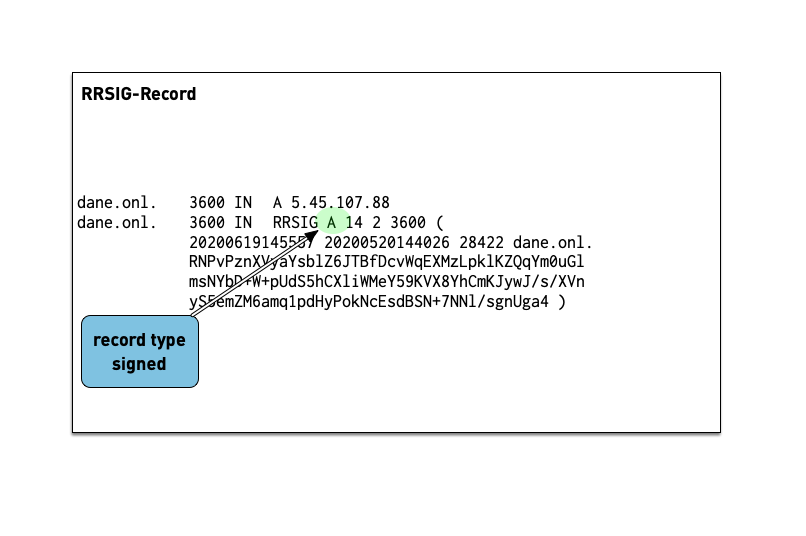
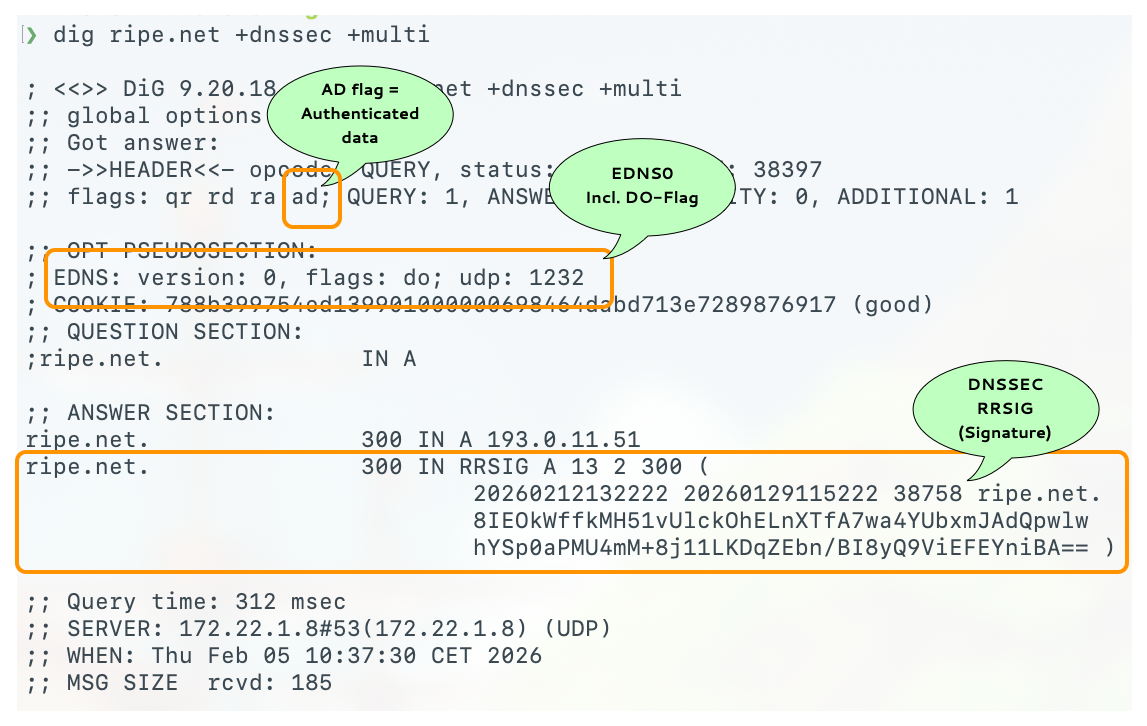
- The RRSIG records holds the cryptographic signature over the DNS data. The first field of the RRSIG holds the type this RRSIG is for. Together with the domain name of the RRSIG this data is important to match the signature to the data record.
- A zone's private key signs the RRSets in the zone.
- The signatures are added to the zone as RRSIG RRs.
- If two key pairs are in use, each RRSet is signed twice, and there is double the number of signatures.
- Signatures have start and expiration times (typically a month or
less apart).
- They must be replaced before expiring. BIND 9 can automate the signature updates.
- Keys don't have expiration timers.
- Work on the DNS resolver machine
- Ask for the DNSSEC signature of
dnssec.works NS:$ dig dnssec.works NS +dnssec +multi
- Answer these questions
- Which algorithm is this zone using? check the number against IANA Domain Name System Security (DNSSEC) Algorithm Numbers
- When does the signature expire?
- When did the signature become valid?
8.1.2 DNSKEY
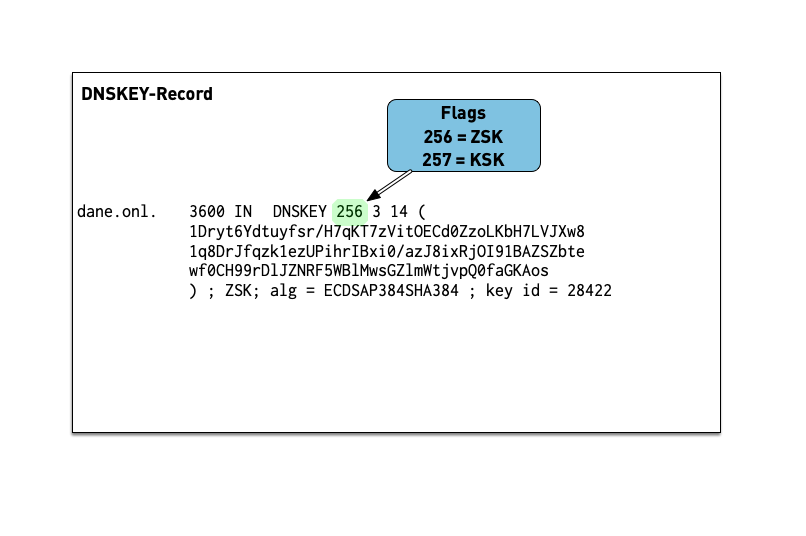
- The public key of a DNSSEC key pair is stored in an DNSKEY RR.
- The private key is not publicly available or accessible through DNS.
- DNSKEY RRs are stored in the zone they can verify.
- This conveniently means the zone administrator can sign all the RRSets and create the DNSKEY RRSet.
- Work on the DNS resolver machine
- Ask for the DNSSEC keys of
dnsworkshop.cz:$ dig dnsworkshop.cz DNSKEY +dnssec +multi
- Answer these questions
- Which algorithm is this zone using?
- Compare the size of keys and signature with the zone
dnssec.works - The sizes of both DNS answer messages as reported by
dig
8.2 The chain of trust in DNS
- If an attacker breaks into the server with the master zone file, she can change any data, including the DNSKEY RRSet.
- The DNSKEY RRSet is signed by the zone's private key!
- That signature, even when validated, proves nothing.
- It's a circular problem.
- External validation is needed, but we can't look beyond DNS.
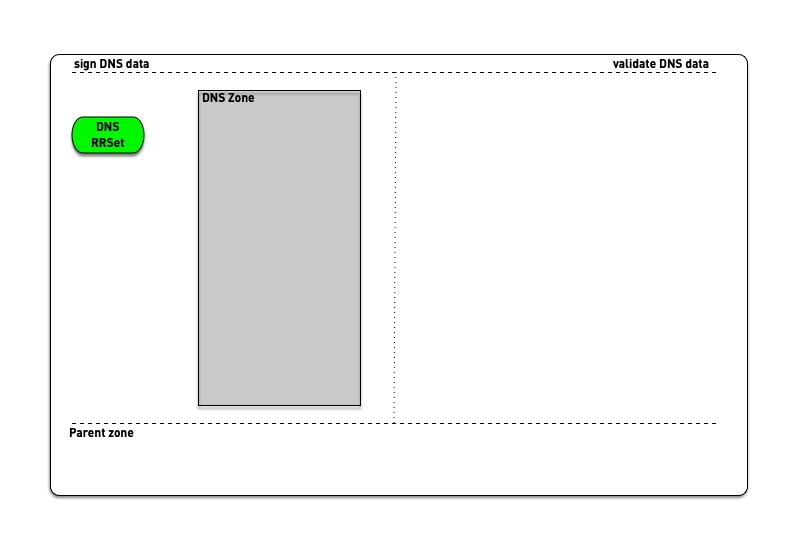
- DNSSEC creates a chain of trust between the parent zone and the child zone

- Applications and DNS resolver can follow the chain of trust to a configured trust anchor to validate the DNS data
8.2.1 DS Record
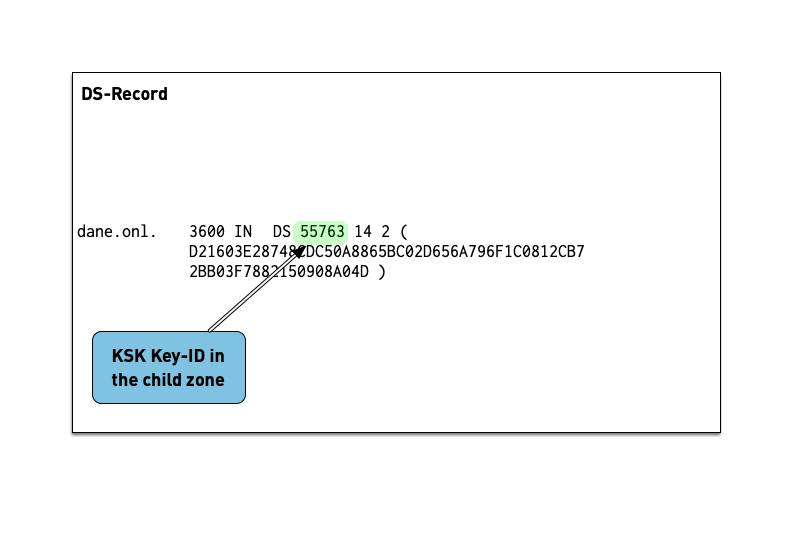
- The Delegation Signer (DS) records holds the hash of the
Key-Signing-Key of a DNSSEC signed child zone.
- It is used to verify that the KSK has not been replaced without permission
- The DS record is usually submitted to the parent zone operator
via a web-based or API system implemented by the domain reseller
(registrar)
- This interface can become a target for attacker that want to change data in a DNSSEC signed zone and should be protected (two factor signon, registry lock etc).
- Work on the DNS resolver machine
- Ask for the DNSSEC delegation signer of
isc.org:$ dig isc.org DS +dnssec +multi
- Answer these questions into the chat
- Which DNSSEC-Key-Algorithm is this zone using?
- What is the current key-id of the KSK in the zone
isc.org? - What hashing algorithm is used for the DS record of
isc.orgcheck against Delegation Signer (DS) Resource Record (RR) Type Digest Algorithms?
9 DNSSEC signing and validation
10 DNSSEC validation
10.1 DNSSEC in DNS Messages
- Even if a client does not explicitly request DNSSEC by setting the
DOflag in a recursive query, it is protected.- It benefits from DNSSEC, if its recursive server is configured for DNSSEC.
- The recursive server will return SERVFAIL if the requested RRSet proves unauthentic.
DOFlag: DNSSEC OK- The client is requesting the authoritative server to return the
RRSIG together with the queried RRSet.
- The client is commonly a resolver, but it could be a stub resolver or application.
- With EDNS the client also announces the UDP packet size it will handle.
- If the
DOflag is not set, RRSIGs are not returned by authoritative servers.
- The client is requesting the authoritative server to return the
RRSIG together with the queried RRSet.
ADFlag: Authentic Data- The resolver uses the
ADflag to inform a DNSSEC-aware client that it has successfully authenticated the RRSet. - An unauthentic RRSet will not be sent to the client; the resolver
returns
SERVFAIL.- Without DNSSEC,
SERVFAILmeans an authoritative server isn't responding.
- Without DNSSEC,
DOis client (resolver) to authoritative server, andADis recursive resolver to client.
- The resolver uses the
CDFlag: Checking Disabled- An application or stub resolver can tell the recursive server that it will validate the DNSSEC information itself.
- This is ideal where the recursive server can't be trusted.
- A recursive server is often run by a third party, e.g. an ISP or Internet cafe, and therefore is not inherently trustworthy.
- Additionally, the connection between the application or stub resolver with even a trusted recursive server, is likely insecure.
- There is no way for a client to force a recursive resolver to use, or not use, DNSSEC.
CDwithDOtells the recursive resolver to return the queried RRSet regardless of its authentication.- The
CDflag is an excellent debugging resource. - For example, if a client receives SERVFAIL, requerying with dig can indicate if the problem is DNSSEC or not.
$ dig example.com +cdflag
- The
COFlag - Compact Answers OK- Compact Denial of Existence is a new DNSSEC extension that
allows authenticated Denial of Existence with
NSEC(and optionallyNSEC3) for online signer- it also prevents Zone Walking, even with
NSECrecords - the
COFlag is send by an DNS resolver towards authoritative DNS-servers (primary or secondary) to inform the receiver that the sender does understand the new compact answers - the
COFlag is encoded inside the EDNS-Flag-space (alongside theDO-Flag)
- it also prevents Zone Walking, even with
- Details: RFC 9824 Compact Denial of Existence in DNSSEC (September 2025)
- Compact Denial of Existence is a new DNSSEC extension that
allows authenticated Denial of Existence with
10.2 DNSSEC data in DNS messages
10.3 Basics of DNSSEC validation
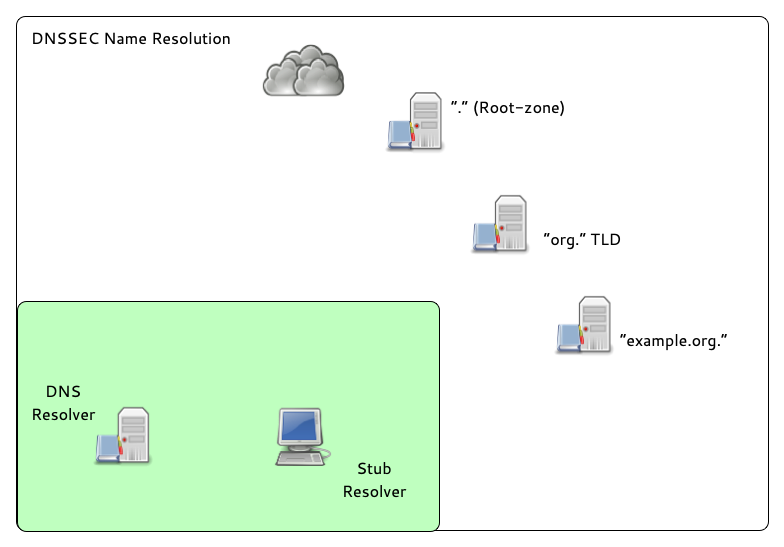
- When the validator gets an RRSIG in a response, it needs the DNSKEY
and DS RR to authenticate.
- If validation fails, the signed RRs are discarded, and SERVFAIL error is returned to the client.
- If no appropriate trust anchor exists, the RRSIG is ignored.
- If the chain of trust is broken the signature is ignored.
- The steps in the following animation are simplified.
- It only shows validation using one key per zone (SSK/CSK).
- Commonly, a zone has ZSK & KSK, so there are additional steps.
10.4 Extended DNS errors (EDE)
- RFC 8914 - Extended DNS Errors defines a way to deliver additional
error information in an DNS response. It is implemented in
digsince version BIND 9.16.4. BIND 9.18 and other open source DNS-Server support EDE-Messages, as well as some DNS resolver on the Internet (like Cloudflare):
$ dig lame.defaultroutes.org soa @1.1.1.1                         <

; <<>> DiG 9.18.41 <<>> lame.defaultroutes.org soa @1.1.1.1
;; global options: +cmd
;; Got answer:
;; ->>HEADER<<- opcode: QUERY, status: SERVFAIL, id: 29410
;; flags: qr rd ra; QUERY: 1, ANSWER: 0, AUTHORITY: 0, ADDITIONAL: 1

;; OPT PSEUDOSECTION:
; EDNS: version: 0, flags:; udp: 1232
; EDE: 22 (No Reachable Authority): (at delegation lame.defaultroutes.org.)
;; QUESTION SECTION:
;lame.defaultroutes.org.		IN	SOA

;; Query time: 705 msec
;; SERVER: 1.1.1.1#53(1.1.1.1) (UDP)
;; WHEN: Mon Nov 03 13:19:33 CET 2025
;; MSG SIZE  rcvd: 94
10.5 DNS/DNSSEC error reporting
- The RFC 9567 - DNS Error Reporting describes a way for DNS resolver software to report DNS name resolution error conditions back to the operator of the authoritative DNS zone
- This function is similar to DMARC reporting in email
- The errors reported are based on "Extended DNS Errors (EDE, RFC 8914)"
- The reporting is done within the DNS protocol
- Authoritative DNS server can opt-in for error reports using an EDNS option
- Authoritative DNS Server can select to receive only error conditions or also positive feedback (on successful name resolution)
- To report an error, the reporting resolver encodes the error
report in the QNAME of the reporting query. The reporting
resolver builds this QNAME by concatenating the
_erlabel, the extended error code, the QTYPE and the QNAME that resulted in failure, the label_eragain, and the reporting agent domain - The resulting domain name (QNAME) is then used to query for a NULL resource record, which will report back the error condition
- The reporting agent domain is usually different from a production domain. The reporting agent domain should not be DNSSEC signed, as only the queries are of use and the responses do not need to be secured
- The authoritative DNS server will respond with a NODATA/NXRRSET response, which will be cached by the resolver (the negative TTL on this response will set the error report interval, as new reports for the same error will only be send once the TTL has expired)
- Example (taken from the RFC):
- The domain
broken.testis hosted on a set of authoritative servers. One of these serves a stale version. This authoritative server has a severity level of 1 and a reporting agent configured:a01.reporting-agent.example. - The reporting resolver is unable to validate the
broken.testRRSet for type A, due to an RRSIG record with an expired signature. - The reporting resolver constructs the QNAME
_er.7.1.broken.test._er.a01.reporting-agent.exampleand resolves it. This QNAME indicates extended DNS error 7 occurred while trying to validatebroken.testtype 1 (A) record. - After this query is received at one of the authoritative servers
for the reporting agent domain (
a01.reporting-agent.example), the reporting agent (the operators of the authoritative server fora01.reporting-agent.example) determines that the authoritative server for thebroken.testzone suffers from an expired signature record (extended error 7) for type A for the domain namebroken.test. The reporting agent can contact the operators of broken.test to fix the issue.
- Error Reporting is currently available in Unbound (Version 1.23 - April 2025) and will be available in the upcoming BIND 9.22.x versions (Q1/Q2 2026).
- The domain
11 DNSSEC Keys
11.1 Algorithms for DNSSEC
DNSSEC keys can be generated with different crypto algorithms. Some of these algorithms are obsolete and deprecated, others are not (yet) widely supported by deployed DNS software to be useful
| Algorithm | No. | Note |
|---|---|---|
| 1 | deprecated, not implemented | |
| 5 | not recommend, deprecated for DNSSEC signing, not supported in Red Hat Enterprise Linux 9 (and up) | |
| RSASHA256 | 8 | recommended |
| RSASHA512 | 10 | large keys, large signatures, risk of UDP fragmentation or TCP fallback |
| 3 | deprecated, slow validation, no extra security | |
| 12 | deprecated | |
| ECDSA | 13/14 | small signatures, read RSA vs ECDSA for DNSSEC |
| ED448/ED25519 | 16/15 | not supported by legacy resolver RFC 8080 / RFC 8032 Edwards-Curve Digital Signature Algorithm (EdDSA) / Assessing DNSSEC with EdDSA |
| SM2SM3 | 17 | SM2 and SM3 are cryptographic algorithms that are national standards for China, as well as ISO/IEC standards RFC 9563 |
| GOST-2012 | 23 | GOST R 34.10-2012 and GOST R 34.11-2012 are Russian national standards. Their cryptographic properties haven't been independently verified. RFC 9558 |
11.2 DNSSEC key sizes for RSA algorithm
- Every additional bit increases the strength of a DNSSEC against brute-force attacks to break the key
- Double the RSA key size results in
- Generating signatures is up to eight times more work
- Validation of DNSSEC signatures inside an DNS resolver up to 4 times more work
- Size of key and signature records increases and can create operational issues
11.2.1 Problems with large DNS response messages
- Fragmentation of IPv4 and IPv6 UDP messages
- Hurts performance
- Fragmented IPv6 packets (containing a fragment header) could be blocked on the Internet backbone
- Enables UDP fragmentation attacks against non-validating DNS resolver
- DNS amplification attacks
The goal should be that the DNSKEY RRSet during an KSK rollover (including perhaps an emergency KSK) stays below 1232 byte
11.3 KSK and ZSK
- For organizational reasons, DNSSEC splits the chain of trust inside a DNS zone onto two different keys: the Key-Signing-Key (KSK) and the Zone-Signing-Key (ZSK)
11.3.1 KSK:
- The KSK generates only one signature: the signature over the DNSKEY record (RRset)
- The hash of the KSK is stored in the parent zone as the DS record. This hash is used to close the chain of trust from the parent zone to the DNSSEC signed zone. Each time the KSK in the DNSSEC signed zone is changed, the DS record in the parent zone must be replaced. The KSK has therefore a dependency on the parent zone.
- Because of this dependency with the parent zone, the KSK is usually a stable and strong key and not rolled often
11.3.2 ZSK:
- The Zone-Signing-Key does not have dependencies to external resources and can be rolled at any time
- Usually the ZSK is rolled often (and automatically), so the key does not need to be particularly strong
11.4 BIND 9: KSK/ZSK signature over the DNSKEY record set
- For historical reasons, BIND 9 generates two signatures over the
DNSKEY record set:
- one signature generated with the KSK (required)
- one signature generated with every active ZSK (optional)
- This can generate larger than good DNSKEY record answer messages
- BIND 9 can be configured to only generate a signature using the KSK
options {
  [...]
  dnssec-dnskey-kskonly yes;
};
11.5 Lifetimes of DNSSEC keys
- DNSSEC keys have an organisational lifetime (there is no technical
limit on the lifetime, unlike with X.509 TLS certificates)
- the administrator responsible for a DNSSEC-signed zone can decide when to change the DNSSEC keys
- Renewing the DNSSEC key material of a zone is called a key rollover
- Keys with weak algorithms or short key lengths should be changed
(rolled) in shorter intervals
- 1024bit RSASHA256 -> 30 days (ZSK)
- 1536bit RSASHA256 -> 120 days (ZSK)
- 2048bit RSASHA256 -> 360 days (KSK)
- 2560bit RSASHA256 -> 720 days+ / 2 years+ (KSK)
11.6 DNSSEC Signer "Best-Practices"
- Zones with high security requirements should keep the DNSSEC keys
"offline"
- this requires manual DNSSEC signing
- Keys can be stored securely in Hardware Security Modules (HSM)
- HSM selection criteria for DNSSEC signing
- Number of key storage slots
- Timely support for new operating system releases (Linux distribution)
- Timely support for new OpenSSL releases
- Stability of the HSM-Driver
- Zones with medium to low security requirements should use a
hidden-primary DNSSEC signer configuration
- The DNSSEC signing authoritative server is not exposed to the Internet, it will not receive DNS queries
- DNS secondary authoritative servers in the Internet will receive the DNSSEC signed zone from the hidden DNSSEC signer through DNS zone transfer
- The DNSSEC key material is secured with operating system level permissions
- With full automation of DNSSEC key-rollovers, the DNS server administrators don't need access to the DNSSEC keys
- Login and access to the DNSSEC key files should be audited (Logging online and towards a remote log server)
- Zone content can be split across multiple zones or DNS server
with DNS delegation
- Every zone can have a different DNSSEC security level
- Example: main zone
example.comsigned via a hidden-signer (keys not exposed to the Internet) has a sub-zone with e-mail address hashes (OPENPGPKEY and SMIMEA) in the zonesecuremail.example.com) which is secured with NSEC3-NARROW scheme and keys that are online on every authoritative server
12 Building the authoritative DNS Server
- Repeat the steps for the next chapter on the
nsNNaandnsNNbvirtual machines (primary and secondary authoritative server)
12.1 Enable the ISC BIND 9 repository for Enterprise Linux
- Add the ISC BIND 9 repository to the packet-manager repository list
% dnf copr enable isc/bind
- Install the EPEL (Extra Packages for Enterprise Linux) repository (required for additional dependencies needed for BIND 9.20)
% dnf install epel-release
12.2 Installing BIND 9.20
- Install BIND 9.20 from the ISC repositories
% dnf install isc-bind
- ISC and EPEL signing keys
Importing GPG key 0xC35B531D:
 Userid     : "isc_bind (None) <isc#bind@copr.fedorahosted.org>"
 Fingerprint: 490C 4AE6 3D8A 6B24 A641 2C8D ED4A 0B1B C35B 531D
 From       : https://download.copr.fedorainfracloud.org/results/isc/bind/pubkey.gpg

Importing GPG key 0x3228467C:
 Userid     : "Fedora (epel9) <epel@fedoraproject.org>"
 Fingerprint: FF8A D134 4597 106E CE81 3B91 8A38 72BF 3228 467C
 From       : /etc/pki/rpm-gpg/RPM-GPG-KEY-EPEL-9
- Quick reference for the
nameddaemon:- The configuration file can be found at:
/etc/opt/isc/scls/isc-bind/named.conf - Command line options for the daemon can be specified in:
/etc/opt/isc/scls/isc-bind/sysconfig/named
- The configuration file can be found at:
- Note that due to the nature of Software Collections, no BIND 9
daemon or utility installed by these packages is available in $PATH
by default. To be able to use them, do the following:
- To enable the Software Collection for the current shell, run
scl enable isc-bind bash - To enable the Software Collection inside a shell script, add the
following line to it:
source scl_source enable isc-bind
- To enable the Software Collection for the current shell, run
% source scl_source enable isc-bind
% which named
/opt/isc/isc-bind/root/usr/sbin/named
- Add BIND 9 SCL path to bash shell startup
% echo "source scl_source enable isc-bind" >> .bashrc
- Link the ISC BIND configuration file directory into the
/etcdirectory (for easy access)
% ln -s /etc/opt/isc/scls/isc-bind /etc
- Enable and start BIND 9
% systemctl enable --now isc-bind-named
- Check that BIND 9 is running without errors
% rndc status
% systemctl status isc-bind-named
12.2.1 A configuration file for an authoritative BIND 9 server
- Let's tweak the configuration file
/etc/isc-bind/named.conffor an authoritative-only DNS server
options {
        directory "/var/named";
        listen-on { any; };
        listen-on-v6 { any; };
        dnssec-validation no;
        recursion no;
        minimal-responses yes;
        minimal-any yes;
        querylog no;
        max-udp-size 1232;
        edns-udp-size 1232;
        zone-statistics yes;
};
- Logging for the authoritative server
logging {
        channel default_syslog {
          // Send most of the named messages to syslog.
          syslog local2;
          severity debug;
        };
        channel xfer {
          file "transfer.log" versions 10 size 10M;
          print-time yes;
        };
        channel update {
          file "update.log" versions 10 size 10M;
          print-time yes;
        };
        channel named {
          file "named.log" versions 10 size 20M;
          print-time yes;
          print-category yes;
        };
        channel security {
          file "security.log" versions 10 size 20M;
          print-time yes;
        };
        channel dnssec {
          file "dnssec.log" versions 10 size 20M;
          print-time yes;
        };
        channel ratelimit {
          file "ratelimit.log" versions 10 size 20M;
          print-time yes;
	      };
        channel query_log {
          file "query.log" versions 10 size 20M;
          severity debug;
          print-time yes;
        };
        channel query-error {
          file "query-errors.log" versions 10 size 20M;
          severity info;
          print-time yes;
        };

        category default        { default_syslog;  named; };
        category general        { default_syslog;  named; };
        category security       { security; };
        category queries        { query_log; };
        category dnssec         { dnssec; };
        category edns-disabled  { default_syslog; };
        category config         { default_syslog; named; };
        category xfer-in        { default_syslog; xfer; };
        category xfer-out       { default_syslog; xfer; };
        category notify         { default_syslog; xfer; };
        category client         { default_syslog; named; };
        category network        { default_syslog; named; };
        category rate-limit     { ratelimit; };
	category update         { update; };
};
- Test the configuration
% named-checkconf
- Reload the BIND 9 configuration
% rndc reconfig
- The last two commands might fail. Why? What can you do to fix the issue?
- Open port 53 (DNS) in the firewall
% firewall-cmd --permanent --zone=public --add-service=dns
% firewall-cmd --reload
- Test if you can reach your new authoritative server from the DNS
resolver
- from the resolver machine (
NN= your number)
- from the resolver machine (
$ dig @nsNNa.dnslab.org ch TXT version.bind
12.3 Solution "Building an authoritative DNS Server":
- Issue: The
/var/nameddirectory is missing and needs to be owned by thenameduser. - Create the
/var/nameddirectory
% mkdir /var/named
- Adjust the permissions on the BIND 9 home directory
% chown named: /var/named
- The BIND 9 process should now successfully load the new configuration
% rndc reconfig
12.4 Create a primary zone
- Work on the primary DNS server
nsNNa - Goal: a working primary zone for this training lab environment
- The trainer will publish the solution after some time into the exercise, but first try to create the configuration without outside help
12.4.1 A zone file
- Create a new zone file for the zone
zoneNN.dnslab.orgin the BIND 9 home directory/var/named - The zone records should have a TTL of 60 seconds (not recommended for production, but required for the course labs)
- The zone should contain: 1 x SOA, 2 x NS records (for
nsNNaandnsNNb) - One A record for the name
primary.zoneNN.dnslab.org(IPv4 ofnsNNa) - One AAAA record for the name
primary.zoneNN.dnslab.org(IPv6 ofnsNNa) - One A record for the name
secondary.zoneNN.dnslab.org(IPv4 ofnsNNb) - One AAAA record for the name
secondary.zoneNN.dnslab.org(IPv6 ofnsNNb) - A TXT record with the owner-name of
textand a text of your choice - Two MX records for
primaryandsecondarywith different preference values - Check the syntax of your zone-file with
named-checkzone
12.4.2 Register the zone in the BIND 9 configuration
- Create a zone block in
named.conffor a primary zone for the zone created in the last chapter - Test the configuration with
named-checkconf -z - Reload the BIND 9 configuration
- Verify that
nsNNa.dnslab.organswers authoritatively for this zone (AA-Flag!)
12.4.3 Solution for primary zone
- The Zonefile (your zone will have different IPv4 and IPv6 addresses)
$TTL 60
@          IN SOA       nsNNa.dnslab.org. hostmaster.zoneNN.dnslab.org. 1001 1h 30m 41d 30
           IN NS        nsNNa.dnslab.org.
           IN NS        nsNNb.dnslab.org.
           IN MX        10 primary
           IN MX        20 secondary
primary    IN A         192.0.2.53
           IN AAAA      2001:db8:100::53
secondary  IN A         192.0.2.153
           IN AAAA      2001:db8:200::53
text       IN TXT       "DNS Leap Ahead!"
- The primary zone configuration on
nsNNa
zone "zoneNN.dnslab.org" {
    type primary;
    file "zoneNN.dnslab.org";
};
12.5 Register the zone on a secondary server
- Work on the secondary DNS server
nsNNb - Goal: a working secondary zone for this training course
- The trainer will publish the solution after some time into the exercise, but first try to create the configuration without outside help
- Create a zone block in
named.confon the secondary server to load the zonezoneNN.dnslab.orgfrom the primary server via zone transfer - Check the configuration with
named-checkconf -z - Reload the BIND 9 configuration
- Check the log files for errors
- Check the file
transfer.logfor successful transfer of the zone- The transfer fails – why? How to solve this issue?
- Verify that
nsNNb.dnslab.organswers authoritatively for this zone (AA-Flag!) - Verify the delegation of your DNS servers with
dig zoneNN.dnslab.org +nssearch
12.5.1 Solution for secondary zone
- Starting with BIND 9.20.0, outgoing zone transfers are no longer
enabled by default. An explicit
allow-transfer ACLmust now be set at the zone, view, or options level to enable outgoing transfers.- Here we use a simple "allow all" ACL (restoring the old, pre-BIND-9.20 behavior). We will learn later in the course how to secure zone transfer with cryptographic keys (TSIG).
- The primary zone on
nsNNa
zone "zoneNN.dnslab.org" {
    type primary;
    file "zoneNN.dnslab.org";
    allow-transfer { any; };
};
- The secondary zone on
nsNNb
zone "zoneNN.dnslab.org" {
    type secondary;
    primaries { <ipv6-address-of-primary>; <ipv4-address-of-primary>; };
    file "zoneNN.dnslab.org";
};
13 Video: Die Schlüssel zum Internet (Pro 7 Galileo)
14 DNS Performance Test Tools
perfaus Unboundqueryperfaus dem BIND 9 Quellcode Repodnsperfundresperfvon DNS-OARC https://www.dns-oarc.net/tools/dnsperfDNS-Shotgunhttps://dns-shotgun.readthedocs.io/en/stable/replaying-traffic/
15 DNS-Resolver-Tests einer DNS-Domain mit unterschiedlichen DNS-Anfrage-Optionen (MTU, EDNS, Fragmentierung etc)
16 DNSSEC signing with BIND 9
16.1 Manual zone signing
- Since BIND 9.6 zones can be signed manually (BIND 9.6 was the first version to support the new DNSSEC version)
- Benefits:
- The signing can be done offline on a machine not connected to any network, BIND 9 does not need to be running on the signing machine
- The DNSSEC private keys can be stored on security devices such as Hardware Security Modules (HSM) and can be encrypted
- The generated DNSSEC signed zone files are universal and can be used in any DNS server that supports DNSSEC signed zones
- The parameters of the signing process can be tuned
- Drawbacks:
- Manually signed zones need to be refreshed (re-signed) periodically so that the signatures do not expire
- Any automation must be done through custom scripts
16.2 Manual signing with BIND 9
- These are the steps to manually sign a zone for BIND 9
- Create a Zone-Signing-Key (ZSK)
- This requires good real entropy (randomness) in the operating system. If the key creation process takes too long (more than a minute for a key), there might not be enough entropy in the system. In such case a hardware random number generator or a software entropy gathering daemon (such as haveged) can help
% dnssec-keygen -a RSASHA256 -b 1536 zoneNN.dnslab.org
Generating key pair.........++++ ............................
KzoneNN.dnslab.org.+008+16239

% more KzoneNN.dnslab.org.+008+16239.key
; This is a zone-signing key, keyid 16239, for zoneNN.dnslab.org.
; Created: 20160202121320 (Tue Feb  2 13:13:20 2016)
; Publish: 20160202121320 (Tue Feb  2 13:13:20 2016)
; Activate: 20160202121320 (Tue Feb  2 13:13:20 2016)
zoneNN.dnslab.org. IN DNSKEY 256 3 8 AwEAAc1xFtt40wPEx4TVB7h8Ac7HvMZuF1LIqESU/0HUUzDT2rkujMdL
z0fgJJQVStYIbb1fXN0/PmKayEpj5ScbT7WU9Bef6b49uG1PwhsaftRr
/udr3DEA6MTEdRqkl8K+E3P9hFj4XKxus45MYVSPaXZg3TcIQK3xpXC8
sKISny43cQaJpm12oBtKsANlA25KRJC8soP1s/GqLSnArWDMN/YGqvs0
QECulpm2Nh1uULZfzwga8515xizyx5yAl/sgWQ==
- Generate a Key-Signing-Key with the same DNSSEC algorithm used
for the ZSK
% dnssec-keygen -a RSASHA256 -b 2048 -f KSK zoneNN.dnslab.org
Generating key pair...................................................
KzoneNN.dnslab.org.+008+04351

% more KzoneNN.dnslab.org.+008+04351.key
; This is a key-signing key, keyid 4351, for zoneNN.dnslab.org.
; Created: 20160202121714 (Tue Feb  2 13:17:14 2016)
; Publish: 20160202121714 (Tue Feb  2 13:17:14 2016)
; Activate: 20160202121714 (Tue Feb  2 13:17:14 2016)
zoneNN.dnslab.org. IN DNSKEY 257 3 8 AwEAAcmn/QkiCne922gBBBuJJOnq9jnG2yYbB10zBS2SgUCUxlZfM2ja
PAyubB2V+QhFsKf0VKUsVGl28JWAMcG1NGitj+nna4sGwvmeumj70DbG
ZzynwcFknEZG1Swn2bM/OFmlMS2WV3luzDYKnLeZgvN5geB6ZetONlpP
H9am3MRmExNIxoFb5NEcUlCzxSUI5GzjPZtGmCtDoNKrGE5nsssCgrjw
ec6hbeXLOjP9JiQ3egF3+PJHLUOjuqXKwSofHw4jV4Rqc3eP+uAHk5Wp
iH/BNW7c7lJ9IP+jZYZ3dp3SkO2qU8BOVV4fcm1L+IVcA9jwuuPaOV53
j9L8fCTL/Uk=
- This is the content of the unsigned DNS zone
$TTL 3600 $ORIGIN zoneNN.dnslab.org. @ IN SOA serverNN.dnslab.org. hostmaster.zoneNN.dnslab.org. ( 1001 ; serial 1d ; refreh 2h ; retry 4w ; expire 30m ; negTTL ) IN NS serverNN.dnslab.org. IN MX 10 mail.zoneNN.dnslab.org. www IN A 192.168.53.199 mail IN A 192.168.53.199 - Add the public part of the ZSK and KSK to the zone (be careful
with the shell redirection!) or use master file
$INCLUDEsyntax.% cat KzoneNN.dnslab.org.+008+*.key >> zoneNN.dnslab.org
- Sign the zone file
% dnssec-signzone -o zoneNN.dnslab.org \ -k KzoneNN.dnslab.org.+008+04351.private \ zoneNN.dnslab.org \ KzoneNN.dnslab.org.+008+16239.private Verifying the zone using the following algorithms: RSASHA256. Zone fully signed: Algorithm: RSASHA256: KSKs: 1 active, 0 stand-by, 0 revoked ZSKs: 1 active, 0 stand-by, 0 revoked zoneNN.dnslab.org.signed - Zone signing tool syntax:
dnssec-signzone -o <origin> -k <KSK-private> <zone-file> <ZSK-private>
- If the error message
dnssec-signzone: fatal: SOA is not signed
       (keys offline or inactive?)
is displayed, then the KSK and ZSK have been given in the wrong order - Additional options for
dnssec-signzone-j secJitter, variation in seconds of the signature validity-M maxttl- specifies the maximum allowed TTL in the signed zone. Higher TTL values will be capped to this number.-s starttime- start of validity of the signatures-e endtime- expire time of the signatures-N SOA-format- format of the SOA serial numberkeepdo not modify the current SOA serial numberincrementincrement the current SOA by onedateset the SOA serial number to today's date inYYYYMMDDnnformatunixtimeuse the Unixtime (seconds since 1.1.1970) as the SOA serial
-xonly create one signature for the DNSKEY record set (using the KSK)-n numcpususe this amount of CPU cores for signing-tprint performance statistics after signing
- If the error message
- The signed zone is stored in a new file with the name of the
original zone file and the extension
.signedzoneNN.dnslab.org. 3600 IN SOA serverNN.dnslab.org. hostmaster.zoneNN.dnslab.org. ( 1001 ; serial 86400 ; refresh (1 day) 7200 ; retry (2 hours) 2419200 ; expire (4 weeks) 1800 ; minimum (30 minutes) ) 3600 RRSIG SOA 8 3 3600 ( 20160303114542 20160202114542 16239 zoneNN.dnslab.org. jT+M9IhjViHkoLnC5/y+MaHYoxpcoyHvif7H sFESQfk7JBx654zb7OZ2LVxsmMnGtiqxkLlD l5nJtBJuWXMufPLks+qQb42YjdGgU6vf5WOI GkTyTMf0ZcNc3ULZZCMG/Vkf3Pak4O6He+cB xvdbDzOOaLcQqlKH8xY/ylmHawJTm8Mmcbb/ 1tL3B/Iv0SI9Lv+F/g+ajaA7fd3bcr0Vueol gOTJ3OZkIEoQFROrn5UMQ/fvbY7Go2TjDT7I GYMu ) 3600 NS serverNN.dnslab.org. 3600 RRSIG NS 8 3 3600 ( 20160303114542 20160202114542 16239 zoneNN.dnslab.org. ColPExa9EdSA1Nt1DsEtX5qjYzNWA8vUl8ef oJG409V6BX4JJsK7RJGCGlmqDIA7HO1IQKug 64N+fD/IuVjqHsPxc/YtP1sdnnLjYK0rHgG7 kMMkoqU7Ta/l/laKKd3jcI/kh66dOsTwYrEC aykvfzYCnVj/rxwEomu2aTbPh/Nt7V2OEXDT EqlmpS34yQ3LvYfnSTTipLYZNS/2kL7NRuEo 1gId5PD/IMAKSpTqfilW1bQUf+CYJF/CGgF5 KRIx ) - Compare the file sizes. The signed zone is much larger
% wc zoneNN.dnslab.org* 23 133 1554 zoneNN.dnslab.org 130 314 5178 zoneNN.dnslab.org.signed 153 447 6732 total - Adjust the zone definition in
named.confto load the new signed zonezone "zoneNN.dnslab.org" IN { type primary; file "zoneNN.dnslab.org.signed"; }; - Check the new BIND 9 configuration. The output should indicate
that the zone is now DNSSEC signed
% named-checkconf -z
zone zoneNN.dnslab.org/IN: loaded serial 1001 (DNSSEC signed)
- Load the DNSSEC signed zone into the BIND 9 DNS server
% rndc reload zoneNN.dnslab.org
- Send the DS record for the KSK to the operator of the parent zone
% cat dsset-zoneNN.dnslab.org.
zoneNN.dnslab.org.  IN DS 16239 8 1 C0213 ... 0373A
zoneNN.dnslab.org.  IN DS 16239 8 2 EAC59 ... E694690565680E3F6D201 E2650EAE
16.3 Exercise: Signing BIND 9.6 style (manual signing)
- Create a Zone Signing Key (ZSK), RSASHA256 Algorithm and 1024 bit length
% mkdir -p /etc/bind/keys
% cd /etc/bind/keys
% dnssec-keygen -a RSASHA256 -b 1024 zoneNN.dnslab.org
- Create a Key Signing Key (KSK), RSASHA256 Algorithm and 2048 bit length
% dnssec-keygen -a RSASHA256 -b 2048 -f KSK zoneNN.dnslab.org
- Add the public part of the ZSK and KSK to the zone file and
manually increment the SOA serial number (in a text editor)
% cat KzoneNN.dnslab.org.+008+*.key >> /var/named/zoneNN.dnslab.org
% $EDITOR /var/named/zoneNN.dnslab.org
- DNSSEC sign the zone
% dnssec-signzone -o zoneNN.dnslab.org \ -k KzoneNN.dnslab.org.+008+(KSK).private \ /var/named/zoneNN.dnslab.org \ KzoneNN.dnslab.org.+008+(ZSK).private - Adjust the zone definition in the Bind 9 configuration file to now
load the signed version of the zone file
zone "zoneNN.dnslab.org" { type primary; file "zoneNN.dnslab.org.signed"; }; - Test the BIND 9 configuration, and if no errors are shown, reload
the signed zone into BIND 9
% named-checkconf -z
% rndc reconfig
- Check locally if DNSSEC records are returned from our DNS server
$ dig @localhost zoneNN.dnslab.org SOA +dnssec +multi
- The DS record for the zone can be found in the file
dsset-zoneNN.dnslab.orgin the directory where the zone has been signed. Copy the DS record onto the machine of the trainer (usingscp, usernameuserand passwordDNSandBIND. The trainer is operating the parent zone of your zone and will add the DS record there to close the chain of trust.% cat dsset-zoneNN.dnslab.org. % scp dsset-zoneNN.dnslab.org. user@ns03a.dnslab.org:.
- Wait for the DS record to be published in the parent zone
- Now test DNSSEC validation against your DNS resolver machine
$ dig @<IP-of-resolver> zoneNN.dnslab.org SOA +dnssec +multi
- Query the DS record from the parent
$ dig @<IP-of-resolver> zoneNN.dnslab.org DS +dnssec
- Make a small change to your zonefile (add or change a TXT record),
increment the SOA serial (or use the command
dnssec-signzonewith the parameter-N unixtime) - Test the zone file
% named-checkzone zoneNN.dnslab.org /var/named/zoneNN.dnslab.org
- Re-Sign the zone
% dnssec-signzone -o <zonenname> -k <KSK-private-file> <zonefile> \ <ZSK-private-file> - Load the newly signed zone in BIND 9
% rndc reload zoneNN.dnslab.org
- Check for the changes you made, are they visible? (Do you still see
the AD-Flag?). Adjust the query below to match your changes to the
zone file:
$ dig TXT text.zoneNN.dnslab.org +dnssec +multi
17 DNSSEC Key and Signing Policy
- BIND 9.16 has introduced a new
dnssec-policyfeature as a further step in automation - Configuring a zone to use KASP (Key And Signing Policy) can be
as easy as
zone "example.net" { type primary; dnssec-policy default; ... }; - Requirements
- One of the following
inline-signing yes;    // manual edited zone files
update-policy local;   // dynamic update zone files
- One of the following
- Benefits
- More intuitive and a higher level of automation
- Several vendors use KASP (Knot, OpenDNSSEC)
- Robust
- No need to rely on metadata added by humans
- Use key timing state machine
17.1 Default policy
- Single CSK ("common signing key", also called a SSK - "single
signing key")
- ECDSAP256SHA256 (algo 13) with unlimited lifetime
- RRSIG validity 14 days, refreshed 5 days before expiration
- NSEC
- Key timings:
- DNSKEY TTL: 3600, max zone TTL: 86400 (1 day)
- Key publish and retire safety times: 3600 (1 hour)
- Propagation delay: 300 (5 minutes)
- Parent timings
- DS TTL: 86400 (1 day)
- Propagation delay: 3600 (1 hour)
- Prevent policy changes on upgrade by using an explicitly defined
dnssec-policy, rather than
default
17.2 Creating custom DNSSEC policies in BIND 9
- Below is an example of an custom DNSSEC policy in BIND 9.16+ named "one"
dnssec-policy "one" { keys { ksk lifetime 365d algorithm rsasha256 4096; zsk lifetime 60d algorithm rsasha256 1024; }; }; zone "example.net" { file "example.net.zone"; dnssec-policy "one"; };keysspecify roles instead of specific keyslifetimespecifies duration orunlimitedalgorithmuses mnemonic or number
17.3 Additional configuration of custom policy
dnssec-policy "one" {
    keys {
        ksk lifetime 365d algorithm rsasha256 4096;
        zsk lifetime 60d  algorithm rsasha256 1024;
    };
    dnskey-ttl 600;
    publish-safety PT2H;
    signatures-refresh 7d;

    nsec3param iterations 0 optout no salt-length 0;
};
17.4 Key-and-Signing-Policy (KASP) syntax
dnssec-policy <string> {
    dnskey-ttl <duration>;
    keys { ( csk | ksk | zsk ) [ ( key-directory ) ]
        lifetime <duration_or_unlimited> algorithm <string> [ <integer> ]; ...
    };
    max-zone-ttl <duration>;
    nsec3param [ iterations <integer> ] [ optout <boolean> ] [ salt-length <integer> ];
    parent-ds-ttl <duration>;
    parent-propagation-delay <duration>;
    publish-safety <duration>;
    purge-keys <duration>;
    retire-safety <duration>;
    signatures-refresh <duration>;
    signatures-validity <duration>;
    signatures-validity-dnskey <duration>;
    zone-propagation-delay <duration>;
};
17.5 A real world custom DNSSEC policy
- A KSK with ECDSAP256SHA256 and no automatic key rollover
- A ZSK with ECDSAP256SHA256 and a rollover interval of 30 days
- Signatures are valid for 10 days
- Signatures will be refreshed after 8 days (2 day buffer)
- TTL of DNSKEY records is 2 hours
- Max TTL of other records in the zone is 1 day
- DNSSEC keys will be published one hour after they have become valid (publish-savety)
- DNSSEC keys will be kept in the zone one our after deactivation (retire-safety)
- Expired DNSSEC keys will be removed after 90 days
- Zone transfer between primary and secondary servers is 5 minutes (zone-propagation-delay)
dnssec-policy "example.eu" {
       dnskey-ttl 2h;
       keys { ksk lifetime unlimited algorithm ECDSAP256SHA256;
              zsk lifetime P30D      algorithm ECDSAP256SHA256;
            };
       max-zone-ttl 1d;
       publish-safety 1h;
       purge-keys P90D;
       retire-safety 1h;
       signatures-refresh 8d;
       signatures-validity 10d;
       signatures-validity-dnskey 10d;
       zone-propagation-delay 300;
 };
18 Easy DNSSEC with BIND "default-policy"
- Using DNSSEC policy configuration (available since BIND 9.16) makes DNSSEC easy to deploy
- BIND automatically creates the DNSSEC keys, signs the zone and keeps the signatures updated
- Policy
defaultcauses the zone to be signed with a single combined signing key (CSK) using algorithm ECDSAP256SHA256; this key will have an unlimited lifetime (no key rollover).
18.1 DNSSEC signing the zone
- We work on the primary authoritative server
- Create a new zone file with the name
p.zoneNN.dnslab.orgin/var/named/. The zone should containSOA,NSand oneTXTrecord. TheNSrecord should point tonsNNa.dnslab.org$ORIGIN p.zoneNN.dnslab.org. $TTL 60 @ IN SOA nsNNa.dnslab.org. hostmaster.zoneNN.dnslab.org. 1001 1h 2h 41d 60 IN NS nsNNa.dnslab.org. IN TXT "This is a zone with BIND 9 default policy" - Open the file
/etc/isc-bind/named.confin an editor and add a zone block withdnssec-policy default;line to the configuration::zone "p.zoneNN.dnslab.org" { type primary; file "p.zoneNN.dnslab.org"; dnssec-policy default; inline-signing yes; }; - Check the configuration and reload BIND 9
% named-checkconf -z
% rndc reconfig
- You should now see key files and additional zone-files in the BIND
9 home directory
% ls -l /var/named
- Test if the DNS server returns DNSSEC resource records
$ dig @localhost p.zoneNN.dnslab.org +dnssec +multi
$ dig @localhost p.zoneNN.dnslab.org DNSKEY +dnssec +multi
- Resolve a domain name
p.zoneNN.dnslab.orgfrom your zone on your resolver machine. Does it show theAD-Flag? What might be missing?
18.2 Add the DS-Record from your child-zone to your parent zone
- Your zone
zoneNN.dnslab.org.in the parent ofp.zoneNN.dnslab.org - In order to close the chain of trust, you must publish the
DS-record for
p.zoneNN.dnslab.orgin your own zonezone.dnslab.org. The DS-record contains the hash of the main key of the zone (the KSK or CSK/SSK). The CSK can be found in/var/named/Kp.zoneNN.dnslab.org.+013+<CSK-ID>.key, and the DS-Record can be created with (replace ZZZZZ with the key-id):% dnssec-dsfromkey /var/named/Kp.zoneNN.dnslab.org.+013+ZZZZZ.key
- Add a delegation NS-Record into the parent zone
zoneNN.dnslab.orgp.zoneNN.dnslab.org. IN NS nsNNa.dnslab.org.
- Add the DS-Record to the zone
zoneNN.dnslab.org, increment the SOA serial number, resign thezoneNN.dnslab.org(the parent zone that does not use automation) withdnssec-signzone(same command used in the previous exercises). - Reload the parent zone
% rndc reload zoneNN.dnslab.org
- Try again to query a name from the zone
p.zoneNN.dnslab.org, theADflag should now appear.
19 DNSSEC with dynamic zones
- Since BIND 9.7.4 dynamic DNS-Zones (zones that are managed through dynamic DNS updates) can be DNSSEC signed
- Benefits of DNSSEC with dynamic zones:
- BIND 9 takes care of updating the signatures (RRSIG records) whenever they expire
- The DNSSEC keys can be automatically imported into the zone and also they can be automatically removed once they are no longer in use
- The lifetime of a DNSSEC key can be specified in the DNSSEC-Policy
- Changes to the zone are automatically DNSSEC signed
- The SOA serial number will be automatically incremented for each change
- The parser of the
nsupdatetool used to send dynamic updates prevents syntax errors - The zone journal collects all changes to the zone
- Drawbacks:
- The primary authoritative DNS server with the dynamic zone must have access to the private DNSSEC key material in order to create the signatures. The primary server should not be exposed to the Internet but should be a "Hidden Primary"
- The zone file may not be modified manually. The use of text editors and DNS management scripts on the zone file is not possible anymore
19.1 DNSSEC with a dynamic zone
19.1.1 BIND9 key directory
- Use your virtual lab machine,
nsNNa.dnslab.org(Primary) - Enable DNSSEC (for older BIND 9 versions) and define a
key-directory for the DNSSEC key material
options { directory "/var/named"; key-directory "/var/named/keys"; }; - Add a custom DNSSEC-Policy to your BIND 9 configuration in
/etc/isc-bind/namedbased on the chapter "A real world DNSSEC policy" above. - Check the configuration and load the new configuration into BIND 9
% named-checkconf -z
% rndc reconfig
19.1.2 Zone definition for dynamic zone with DNSSEC
- Create a new zone file for the zone
dynamic.zoneNN.dnslab.orgin the directory/var/named. It is important to use low Time-To-Live values in our lab zones (recommended: 60 seconds)$ORIGIN dynamic.zoneNN.dnslab.org. $TTL 60 @ IN SOA nsNNa.dnslab.org. hostmaster 1001 1h 30m 41d 60 IN NS nsNNa.dnslab.org. - Create the zone definition in the BIND 9 configuration file
named.confupdate-policy local;permits dynamic updates with the BIND 9 session key from/run/named/session.key. This key is being used to authenticate against BIND whennsupdateis started with the parameter-l
zone "dynamic.zoneNN.dnslab.org" IN { type primary; file "dynamic.zoneNN.dnslab.org"; update-policy local; dnssec-policy "my-own-policy-name"; }; - Check the configuration and load the new configuration into BIND 9
% named-checkconf -z
% rndc reconfig
- From this time on the zone file should not be touched by a text editor (never ever)!
- BIND 9 will sign the zone at the next DNSSEC-signing-interval (max. 60 minutes)
- The DNSSEC signing of the zone can be triggered with
rndc sign
   <zone-name>
. The commandrndc signdoes not return an error when the signing process fails. Always check the log files!% rndc sign dynamic.zoneNN.dnslab.org % dig AXFR @localhost dynamic.zoneNN.dnslab.org +multi
19.1.3 Adding a new record to a dynamic zone
- When a new DNS record is added to the zone, it will
automatically be signed
% nsupdate -l
> update add test.dynamic.zoneNN.dnslab.org. 60 IN TXT "a new record"
> send
$ dig @localhost test.dynamic.zoneNN.dnslab.org TXT +dnssec +multi
[..]
;; ANSWER SECTION:
test.dynamic.zoneNN.dnslab.org. 60 IN TXT "a new record"
test.dynamic.zoneNN.dnslab.org. 60 IN RRSIG TXT 8 4 60 (
			20210205142801 20210117081014 32184 dynamic.zoneNN.dnslab.org.
			LbtggFHnWsLV7gEyI5PVdtDJ+LVihuLVHT3Ss1KtsB8a
			...
			yVHm3Tb+qeY+Flj5073NfVPA+oUZa8O4DaPP )
19.1.4 Removing a DNS record from a dynamic zone
- When removing a record from a dynamic zone the record and its
signature record will be removed, also the SOA serial number is
incremented and a new signature for the SOA record is created
% nsupdate -l
> update del test.dynamic.zoneNN.dnslab.org. IN TXT
> send
19.1.5 DS records for dynamic DNSSEC zones
- The DS records for dynamic zones are created with the command
dnssec-dsfromkey. This command takes the file containing the public part of the active KSK of the zone:% dnssec-dsfromkey Kdynamic.zoneNN.dnslab.org.+008.+12345.key dynamic.zoneNN.dnslab.org. IN DS 12345 8 1 B7BE432A2C4A25A0C9F1DA6DD4C289C99C25B2CC dynamic.zoneNN.dnslab.org. IN DS 12345 8 2 DCA5AFBD131982707B55A19CD33048674ADE5FDD9 FFCB008A2F54744 B378B689 - By default, the command prints the SHA1- and SHA256-Hash versions of the DS record. This output can be sent to the operator of the parent zone.
- Some operators might require the public DNSKEY instead as they can generate the hashes themselves
19.2 Exercise: DNSSEC signing a dynamic DNS zone with BIND 9
- Create a new zonefile as a child to the existing zone
zoneNN.dnslab.orgwith the namedynamic.zoneNN.dnslab.org. It should contain one NS record and one SOA record (a bare minimum zone file). Save the zone file into/var/named/dynamic.zoneNN.dnslab.org.$TTL 30 @ SOA nsNNa.dnslab.org. hostmaster 1001 1h 30m 41d 30s @ NS nsNNa.dnslab.org.
- Ensure named can write to the zone file
% chown named:named /var/named/dynamic.zoneNN.dnslab.org
- Add a new zone definition to the BIND 9 configuration file
/etc/isc-bind/named.conf. The Key-Directory is relative to the BIND 9 home directory/var/namedzone "dynamic.zoneNN.dnslab.org" { type primary; key-directory "keys"; update-policy local; dnssec-policy "my-custom-dnssec-policy"; file "dynamic.zoneNN.dnslab.org"; }; - Create the directory for the keys and adjust the permissions
% mkdir -p /var/named/keys
% chown named:named /var/named/keys
- Test the configuration and reload the BIND 9 server
% named-checkconf -z
% rndc reconfig
- Sign the zone with DNSSEC, check for error messages from BIND 9
% rndc sign dynamic.zoneNN.dnslab.org
% journalctl -u named   # or check your logs
- Test: you should see the DNSSEC RRSIG record(s)
$ dig @127.0.0.1 dynamic.zoneNN.dnslab.org SOA +dnssec +multi
- Add a NS record for the delegation to the parent zone
% echo "dynamic.zoneNN.dnslab.org. IN NS nsNNa.dnslab.org." >> \ /var/named/zoneNN.dnslab.org - Create the DS record and add it to the parent zone to close the
chain of trust
% dnssec-dsfromkey /var/named/keys/Kdynamic.zoneNN.dnslab.org.+013+(KSK) \ >> /var/named/zoneNN.dnslab.org - Increment the SOA serial of the parent zone
zoneNN.dnslab.organd re-sign that parent zone (remember, this zone is manually signed)% dnssec-signzone -o <zone-name> -k <KSK-private-file> \ <zone-file> \ <ZSK-private-file> - Re-Load the parent zone
% rndc reload zoneNN.dnslab.org
- You should now see a AD-Flag when querying data of the new dynamic
zone from a DNSSEC validating resolver
$ dig @9.9.9.9 dynamic.zoneNN.dnslab.org SOA +dnssec +multi
- Add a new IPv4 A record to the zone (for testing purposes)
% nsupdate -l
> ttl 30
> add www.dynamic.zoneNN.dnslab.org. IN A 192.0.2.80
> send
> quit
- Query the new entry. Check for the AD-Flag.
$ dig www.dynamic.zoneNN.dnslab.org +dnssec
- Change the IPv4 address of the A record (replace
xxx.xxx.xxx.xxxwith the public IPv4 address of your primary authoritative server)% nsupdate -l > ttl 30 > del www.dynamic.zoneNN.dnslab.org IN A > add www.dynamic.zoneNN.dnslab.org IN A xxx.xxx.xxx.xxx > send > quit
- Test if the new entry can be queried and shows the AD-Flag.
- Delete the
www-Entry from the zone% nsupdate -l > del www.dynamic.zoneNN.dnslab.org IN A > send > quit
- Force the zone file to be written from memory into a file and
display the content
% rndc sync dynamic.zoneNN.dnslab.org
% less /var/named/dynamic.zoneNN.dnslab.org
- All changes to the dynamic zone are written to the BIND 9
journal file for this zone. The journal file has the same name as
the zone file, but with the extension
.jnl - The journal file is a binary file, this file can be converted to
readable format with the command
named-journalprint:% named-journalprint /var/named/dynamic.zoneNN.dnslab.org.jnl
19.3 Exercise: Secure dynamic updates with TSIG keys
- Dynamic updates should always be authorized by a cryptographic key. Authorization by IP address is insecure and not recommended
- In this exercise, we will add TSIG security to our dynamic zone
- Generate a new TSIG key, use the name
dynamic-zoneNN-update-keyas the key name:% tsig-keygen dynamic-zoneNN-update-key > <filename-for-TSIG>.key
- Import the new TSIG key into the BIND 9 configuration file
(you can also use
include "<filename>";if that is more convenient)key "dynamic-zoneNN-update-key" { algorithm hmac-sha256; secret "C7o1qNKcdkLef/1uDw1RQLSs9AqqbK1cliVecoGg0Ww="; }; - Adjust the zone configuration to authenticate dynamic updates
against the TSIG key
zone "dynamic.zoneNN.dnslab.org" { type primary; key-directory "myzones/keys"; // update-policy local; allow-update { key dynamic-zoneNN-update-key; }; auto-dnssec maintain; file "myzones/dynamic.zoneNN.dnslab.org"; }; - Check and reload the BIND 9 configuration
- Use
nsupdateto make changes to your zone$ nsupdate -k dynamic-zoneNN-update-key.key > ttl 60 > add www.dynamic.zoneNN.dnslab.org IN A 1.2.3.4 > send > quit
19.3.1 Recovering from BIND 9 journal mismatch
- If the zone file of a dynamic zone is changed outside DNS
dynamic update, the zone content becomes out-of-sync with the
journal and BIND 9 will refuse to work with the zone (it will not
load anymore). To solve this issue, stop BIND 9, remove the journal
file, fix the zone-file on disk (if needed), and restart BIND 9
% systemctl stop named
% rm /var/named/dynamic/dynamic.zoneNN.dnslab.org.jnl
% systemctl start named
19.3.2 Tools
nsdiff- manage dynamic zones in an editor ("emulating" the static zone workflow) http://dotat.at/prog/nsdiff/
20 NSEC vs. NSEC3
20.1 Authenticated Denial of existence - NSEC vs. NSEC3
- The RRSIG records in DNSSEC secure the positive answers from DNS (answers to queries where DNS records exist)
- But also negative answers need to be protected
- without protection for negative answers, attackers could spoof negative answers to launch denial-of-service attacks. The attacker can make DNS clients believe that a DNS resource does not exist
- DNS knows two kinds of negative answers: NXDOMAIN and NODATA/NXRRSET
- NXDOMAIN = the requested domain name does not exist
- NODATA/NXRRSET = the requested domain name does exist, but the requested record type does not exist for this name
- DNS error messages such as SERVFAIL, FORMERR or REFUSED cannot be secured with DNSSEC (these errors indicate errors in the protocol or in the DNS server infrastructure). If the protocol is broken, DNSSEC can't work either.
- The solution: the NSEC records in the DNSSEC signed zone create a
list of all existing data in the zone (domain names and records
types for the domain names)
- When returning a negative answer, the DNS server returns the negative answer containing the NSEC record (plus a signature for the NSEC record) which proves that the requested data does not exist in DNS
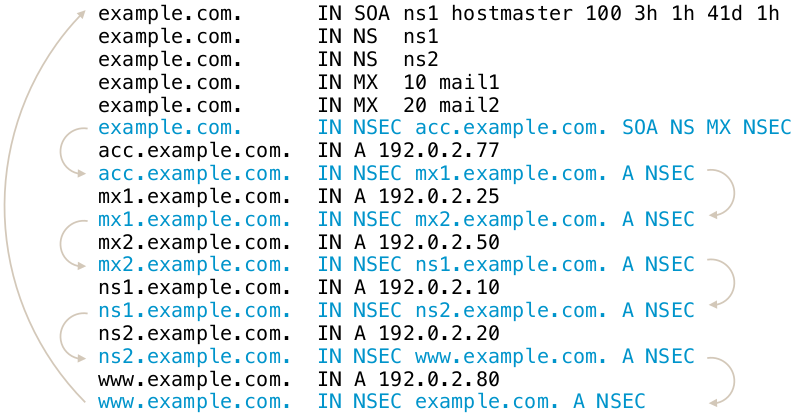
20.2 Issues with NSEC
- The NSEC record is an elegant solution to the problem, but it has
drawbacks:
- It is now possible for outsiders to list the complete zone contents by following the NSEC record chain. This is called zone walking.
- For most zones this is not a big problem, as the DNS zone content is public anyway (SOA, NS records, WWW-A, MX records)
- But it can be an issue for zones with sensitive content (email addresses, hostnames of critical infrastructure, new product names that should no go public yet)
- Operators of TLDs zones stay away from DNSSEC with NSEC, as it allows outsiders to record all changes to the TLD zone (new delegations and delegation removals)
- The new compact authenticated denial of existance standard (RFC 9824) solves this issue.
- Example of zone walking (requires the package
ldns-utils):
$ ldns-walk isc.org
20.3 The NSEC3 record
- RFC 5155 (2008) defines the NSEC3 record as an alternative to NSEC
- All modern DNS servers support NSEC3
- The NSEC3 record works similarly to NSEC, with the difference that the link between the owner names is done using SHA1 hashes of the domain names instead of the clear text names
- NSEC3 makes it harder, but not impossible, to list the zone content
20.4 NSEC3 Chain
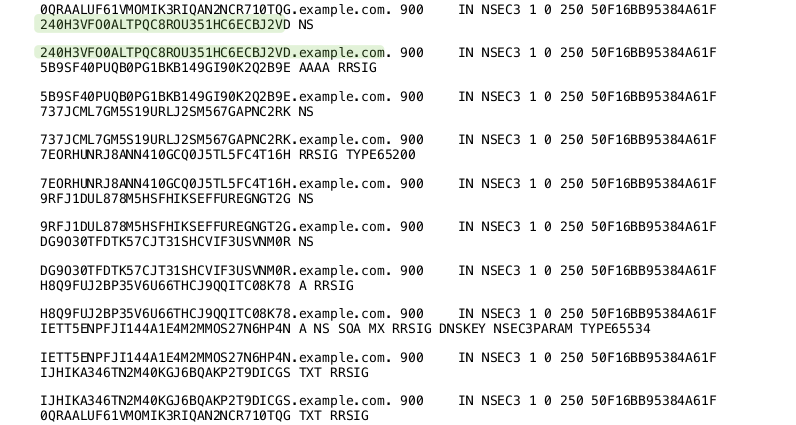
20.5 NSEC3-Parameter
- The NSEC3 record contains a number of parameters used for the
NSEC3 operation
- The hashing algorithm used (currently only SHA1 is defined)
- Flags: allows for DNSSEC opt-out in delegations.
- Number of hash iterations
- A salt value
20.6 NSEC3-Parameter Record
- Every zone with NSEC3 records contains an
NSEC3PARAMrecord. This record holds information needed by authoritative DNS servers to generate NSEC3 records for negative answers - Example: (SHA1, no flags, 20 iterations, salt value "ABBACAFE")
nsec3.dnslab.org. 0 IN NSEC3PARAM 1 0 20 ABBACAFE
20.7 NSEC3 iterations and salt
- The idea of the hash iterations in the NSEC3PARAM record was to
allow the operator of the zone to fine tune the work required for
calculating the hash
- A higher number of iterations should make it harder for attackers to brute force break an NSEC3 domain name
- A higher number also creates more CPU load for DNS resolvers that validate the NSEC3 records, making DNS name resolution slower
- The iteration parameter of an NSEC3 signed zone should be re-evaluated from time to time (yearly) to adjust the value for the technical progress
- The salt should make it impossible for an attacker to pre-calculate rainbow tables for the zone
- The salt is a hexadecimal number, every hex digit contains 4 bit of information
20.8 Problems with NSEC3
- The iterations had more an negative impact on the CPU load of the authoritative DNS servers than preventing attacks
- The salt is not really needed, as each zone naturally has unique hashes so that a rainbow table for multiple zones is not possible
20.9 RFC 9276 - Guidance for NSEC3 Parameter Settings
- RFC 9276 - Guidance for NSEC3 Parameter Settings (Best current practice) gives updates guidelines for NSEC and NSEC3 deployments
- The iterations value should be set to
0(meaning 1 iteration of SHA1 hashing)- DNSSEC responses containing NSEC3 records with iteration counts greater than 150 are now treated as insecure by major DNS resolvers!
- As NSEC3 zones are inherently salted, the salt parameter should be
set to
- - The current recommendation for NSEC3PARAM is
1 0 0 -(SHA1 Hash, no flags, 1 iteration, no salt)
20.10 NSEC3 needed?
- Most DNS zone can work with NSEC instead of NSEC3
- Don't store names in DNS that should be secret (internal names, product names etc)
- DNS is a service to publish data, not for hiding data
20.11 NSEC3 Narrow-Mode
- RFC 7129 (also RFC 4470 and RFC 4471) describe a special variant of
NSEC3 usage, called the narrow mode
- With narrow mode, the NSEC3 records are not pre-calculated when
the zone is signed, but they are created on the fly whenever a
negative response is needed
- To be able to calculate the signatures for such answers, every authoritative DNS server for the zone must have access to the private DNSSEC keys (at least the ZSK)!
- With narrow mode, the NSEC3 records are not pre-calculated when
the zone is signed, but they are created on the fly whenever a
negative response is needed
- With NSEC3 narrow mode, the DNS server does not return an NSEC3
chain of existing records, but a synthetic NSEC3 record that proves
that the requested name does not exist
- This prevents zone walking, as the number of possible NSEC3 records returned is near infinite. It will exhaust the memory of the attacker that will try to store this NSEC3 chain
- Known implementations:
- Phreebird (Dan Kaminski, Proof-of-Concept, not maintained)
- PowerDNS Authoritative
- Cloudflare CDN NSEC3 Narrow-Mode (closed source implementation)
20.12 Exercise: Sign a static zone with NSEC3 instead of NSEC
- Sign a zone with NSEC3 (
saltmust be a hexadecimal number with even count of octets (8,10,12 …) or a single dash (-))% dnssec-signzone -3 <salt> -H <iterations> -o zoneNN.dnslab.org \ -k <KSK-private-file> zoneNN.dnslab.org \ <ZSK-private-file>
21 DNSSEC Key-Rollover
21.1 Why Keyrollover
- The DNSSEC key material is public
- Including the signatures and the matching clear text (DNS record sets)
- The private key can get in un-authorized hands
- By accident
- By attacks on the signing server/HSM
- When using online-signing, the private keys must be live on the signing DNS server
- The key length or the algorithm used is not considered secure for a longer amount of time (for example 1024bit RSA keys)
21.2 The Challenges
- The DNS is not consistent
- DNS zone data can differ for some time between authoritative server of the same zone (delay in zone transfer)
- DNS data is cached in DNS resolvers, operating systems, and applications
- During a DNSSEC key-rollover, the chain of trust must be un-broken at all times from all vantage points of the Internet
21.3 DNSSEC Keyrollover Documentation
- RFC 6781 - DNSSEC Operational Practices, Version 2
- RFC 7583 - DNSSEC Key Rollover Timing Considerations
21.4 Key rollovers, when and how often?
- DNSSEC keys do not have a technical lifetime, they don't expire
- The operational life time of DNSSEC keys is decided by the responsible administrator(s) and can be changed at any time
- The DNSSEC community has different views on KSK key rollovers
- Often and regularly
- Often but irregular (to not give attackers information when the system might be more vulnerable due to the key rollover)
- Only if there is evidence that the key has been compromised or stolen
21.5 ZSK Rollover
- The Zone-Signing-Key has no dependencies to external resources (such as the parent zone)
- A ZSK Rollover can be started at any time
- The 'pre-publication' rollover scheme is used for ZSK rollover
21.5.1 ZSK - pre-publication - Step 1
- Create a new ZSK key pair
- Publish the public part of the new key (DNSKEY) of the ZSK in the zone
- The current/old ZSK is kept in the zone
- The zone is signed with the current/old (not the new) ZSK and KSK
21.5.2 ZSK - pre-publication - Step 2
- Wait for the zone with the new ZSK be visible on all authoritative DNS servers of the zone (zone transfer)
- Wait for the TTL of the DNSKEY RRset (+ some buffer for security)
- Now we can be sure the new ZSK DNSKEY record is in all caches (DNS resolvers, operating systems, applications)
21.5.3 ZSK - pre-publication - Step 3
- Sign the zone with the new ZSK
- The new ZSK is now active, the old ZSK is now retired
- The old ZSK will be kept in the zone for now (it is needed to validate old signatures that still exist in the caches in the network)
21.5.4 ZSK - pre-publication - Step 4
- Wait for the new zone version with the signatures from the new ZSK to be visible on all authoritative DNS servers of the zone (zone transfer)
- Wait for the largest TTL in the zone (plus some buffer)
- Now the signatures created by the old ZSK are expired from the caches, and the new signatures are available
21.5.5 ZSK - pre-publication - Step 5
- Remove the old ZSK from the DNSKEY record set of the zone
- Continue signing the zone with the new ZSK
21.5.6 ZSK - pre-publication in pictures

21.6 Exercise: ZSK Rollover
- In this exercise we will perform a ZSK-Rollover on the manually-signed
zone
zoneNN.dnslab.org. This will be a pre-publish roll-over. - Step 1: create a new ZSK key-pair and note down it's Key-ID
% cd /etc/bind/keys
% dnssec-keygen -a RSASHA256 -b 1024 zoneNN.dnslab.org
- Publish the public part of the new key in the zone. Make sure to
use
>>when using shell redirection.% cat KzoneNN.dnslab.org.+008+<ID-of-the-new-ZSK>.key >> /var/named/zoneNN.dnslab.org
- Increment the SOA serial of the zone (or use the Unixtime as the SOA-serial when signing the zone)
- Sign the zone with the old/current ZSK (to publish the new ZSK)
% dnssec-signzone -N unixtime -o zoneNN.dnslab.org \
   -k <KSK-private-file> \
   /var/named/zoneNN.dnslab.org  \
   <old/current-ZSK-private-file>
- Load the signed zone in the BIND DNS server and check that all
secondaries have loaded the new zone (check the SOA serial number)
% rndc reload
$ dig zoneNN.dnslab.org +nssearch
- Wait for the TTL of the DNSKEY record-set (60 seconds in this case)
- Increment the SOA serial of the zone (or use the Unixtime), then
sign the zone (without any other change) with the new ZSK
% dnssec-signzone -N unixtime -o zoneNN.dnslab.org \ -k <KSK-private-file> \ /var/named/zoneNN.dnslab.org \ <NEW-ZSK-private-file> - Load the signed zone into the BIND 9 DNS server and check that all
secondaries have the new zone loaded (check SOA serial)
% rndc reload
$ dig zoneNN.dnslab.org +nssearch
- Wait for the largest TTL used in the zone (should be 60 seconds in our case)
- Remove the old ZSK from the zone file
/var/named/zoneNN.dnslab.org, increment the SOA serial and sign the zone with the new ZSK:% dnssec-signzone -N unixtime -o zoneNN.dnslab.org \ -k <KSK-private-file> \ /var/named/zoneNN.dnslab.org \ <NEW-ZSK-private-file> - Load the signed zone into the BIND 9 DNS server and check that all
secondaries have the new zone loaded (check SOA serial)
% rndc reload
$ dig zoneNN.dnslab.org +nssearch
- Check that the zone still is being DNSSEC validated (AD-Flag!)
$ dig zoneNN.dnslab.org SOA +dnssec +multi
- This is the end of the ZSK rollover
21.7 KSK Rollover
- The KSK has a dependency on its DS record in the parent zone
- For the KSK rollover we will use the 'double-signing' rollover scheme (the DNSKEY record set will get two signatures, from both, old and new, KSK)
21.7.1 KSK - double-signing - Step 1
- Create a new KSK key pair
- Publish the DNSKEY record of the new key in the zone
- Sign the DNSKEY RRset in the zone with both KSKs (old and new)
21.7.2 KSK - double-signing - Step 2
- Wait until the new zone content with the new KSK is visible on all authoritative DNS server of the zone
- Wait for the TTL of the DNSKEY RRSet (+ some buffer)
- The new KSK is now visible to all DNS clients (through DNS resolver caches)
21.7.3 KSK - double-signing - Step 3
- Send the new DS record to the operator of the parent DNS zone (usually through an API or through an Web-Interface)
- Wait for the DS record to be updated in the parent zone
- Wait for the TTL of the DS record in the parent zone (+ some buffer)
- The new DS record is now visible for all DNS clients
21.7.4 KSK - double-signing - Step 4
- Remove the old KSK from the DNSKEY record set of the zone
- Sign the zone with only the new KSK
- Wait and remove the old DS from the parent zone
21.7.5 KSK - double-signing in pictures
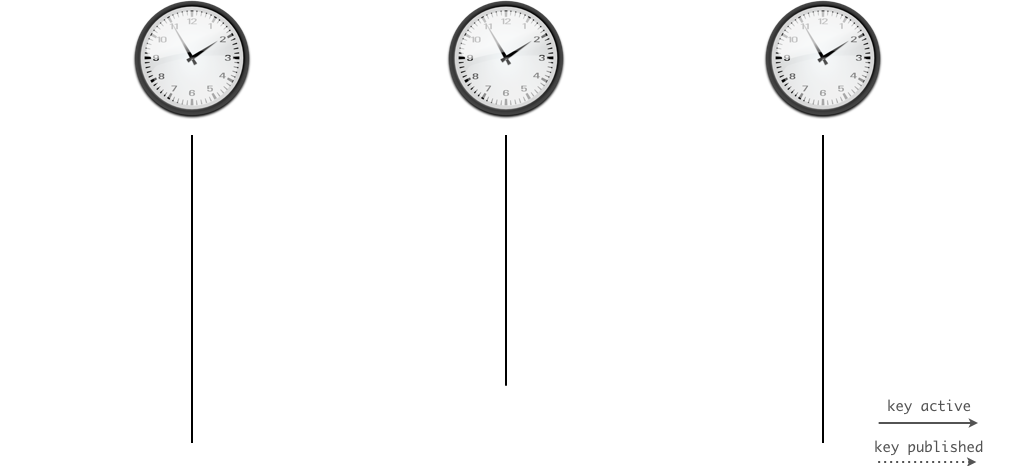
21.8 Exercise: KSK Rollover
- Use your virtual lab machine,
nsNNa.dnslab.org(primary authoritative) - Create a new KSK key pair
% cd /etc/bind/keys
% dnssec-keygen -a RSASHA256 -b 2048 -f KSK zoneNN.dnslab.org
- Publish the new DNSKEY record in the zone, increment SOA-serial (or
use Unixtime), sign the zone with both KSK keys (old and new)
% cat KzoneNN.dnslab.org.+008+<ID-of-new-KSK>.key >> /var/named/zoneNN.dnslab.org % dnssec-signzone -N unixtime -o zoneNN.dnslab.org \ -k <OLD-KSK-private-file> \ -k <NEW-KSK-private-file> \ /var/named/zoneNN.dnslab.org \ <Current-ZSK-private-file> - Load zone into the BIND 9 server and verify that the zone still
validates (AD-Flag!)
% rndc reload
$ dig zoneNN.dnslab.org SOA +dnssec +multi
- Submit the new DS to the parent zone
% scp dsset-zoneNN.dnslab.org. user@ns03a.dnslab.org:.
- Wait for the new DS record to be in the parent zone
$ dig zoneNN.dnslab.org DS
- Wait for the TTL of the DS record in the parent zone and the TTL of the DNSKEY record in the zone (whichever is larger)
- Remove the old KSK DNSKEY record from the zone file, increment the
SOA serial (or use the unixtime feature) and sign the zone with
only the new KSK and the current ZSK
% dnssec-signzone -N unixtime -o zoneNN.dnslab.org \ -k <NEW-KSK-private-file> \ /var/named/zoneNN.dnslab.org \ <Current-ZSK-private-file> - Load the signed zone into the BIND 9 server
% rndc reload
- Check that the zone still validates (AD-Flag!)
$ dig zoneNN.dnslab.org SOA +dnssec +multi
21.9 Algorithm Rollover
- An algorithm rollover is used when the DNSSEC key algorithm of the
zone needs to be changed
- e.g. when switching from RSASHA256 to ECDSASHA256
- During an algorithm rollover, the KSK and ZSK will be changed at
the same time using a double-signing rollover scheme
- During such a roll over, the zone should be monitored for failures and over sized DNS answer messages
- Link: DNSSEC algorithm rollover HOWTO by Tony Finch (Univ. of Cambridge)
21.10 Emergency Rollover Key
- In an emergency, time is at an essence
- To save time on an KSK rollover, step one (publication) can be done
ahead of time
- This published extra key is called the standby key
- It saves time, but makes the DNSKEY RRSet larger
- The standby key is not used during normal DNSSEC signing operation
- If there is a need to change the KSK in an emergency, the zone can almost immediately switch over to the standby key
- The standby key should be replaced (rolled) whenever the production KSK is rolled
22 KSK-2024 Root Zone KSK-Rollover
- The Key-Signing-Key of the Internet Root Zone will be rolled in
October 2026 (for the 2nd time in since the root has been DNSSEC
signed).
- Because this key is the trust-anchor for all of DNSSEC, and the public part or hash of that key has to be present in all DNS-resolver before the roll, special care must be taken by DNS resolver operators.
- The new KSK2024 key (Key-ID 38696) has been created in April 2024
and has been published in January 2025 inside the root DNS zone:
$ dig dnskey . +multi

; <<>> DiG 9.18.41 <<>> dnskey . +multi
;; global options: +cmd
;; Got answer:
;; ->>HEADER<<- opcode: QUERY, status: NOERROR, id: 33764
;; flags: qr rd ra ad; QUERY: 1, ANSWER: 3, AUTHORITY: 0, ADDITIONAL: 1

;; OPT PSEUDOSECTION:
; EDNS: version: 0, flags:; udp: 1232
;; QUESTION SECTION:
;.			IN DNSKEY

;; ANSWER SECTION:
.			77796 IN DNSKEY	257 3 8 (
				AwEAAaz/tAm8yTn4Mfeh5eyI96WSVexTBAvkMgJzkKTO
				iW1vkIbzxeF3+/4RgWOq7HrxRixHlFlExOLAJr5emLvN
				7SWXgnLh4+B5xQlNVz8Og8kvArMtNROxVQuCaSnIDdD5
				LKyWbRd2n9WGe2R8PzgCmr3EgVLrjyBxWezF0jLHwVN8
				efS3rCj/EWgvIWgb9tarpVUDK/b58Da+sqqls3eNbuv7
				pr+eoZG+SrDK6nWeL3c6H5Apxz7LjVc1uTIdsIXxuOLY
				A4/ilBmSVIzuDWfdRUfhHdY6+cn8HFRm+2hM8AnXGXws
				9555KrUB5qihylGa8subX2Nn6UwNR1AkUTV74bU=
				) ; KSK; alg = RSASHA256 ; key id = 20326
.			77796 IN DNSKEY	257 3 8 (
				AwEAAa96jeuknZlaeSrvyAJj6ZHv28hhOKkx3rLGXVaC
				6rXTsDc449/cidltpkyGwCJNnOAlFNKF2jBosZBU5eeH
				spaQWOmOElZsjICMQMC3aeHbGiShvZsx4wMYSjH8e7Vr
				hbu6irwCzVBApESjbUdpWWmEnhathWu1jo+siFUiRAAx
				m9qyJNg/wOZqqzL/dL/q8PkcRU5oUKEpUge71M3ej2/7
				CPqpdVwuMoTvoB+ZOT4YeGyxMvHmbrxlFzGOHOijtzN+
				u1TQNatX2XBuzZNQ1K+s2CXkPIZo7s6JgZyvaBevYtxP
				vYLw4z9mR7K2vaF18UYH9Z9GNUUeayffKC73PYc=
				) ; KSK; alg = RSASHA256 ; key id = 38696
.			77796 IN DNSKEY	256 3 8 (
				AwEAAeuS7hMRZ7muj1c/ew2DoavxkBw3jUG5R79pKVDI
				39fxvlD1HfJYGJERnXuV4SrQfUPzWw/lt5Axb0EqXL/s
				Q2ZyntVmwQwoSXi2l9smlIKh2UrkTmmozRCPe7GS4fZT
				E4Ew7AV4YprTLgVmxiGP4unRuXkYOgQJXCIBpVCmEdUl
				i6X2sm0i5ZilU/Q+rX3RDw+eYPP7K0cJnJ+ZnvQDy14+
				BFtreWl9enNQljgGpBp26lEp1z7AbvUfzkQNVCVGaM8j
				EaCSALXiROlwCQMOdj+tpLXFf99kdJnTQw2cpEr1uGs/
				yENAJpoGhbjZAoIkXzDUBSlfFeYz7FWzH6gIe7M=
				) ; ZSK; alg = RSASHA256 ; key id = 61809

;; Query time: 1 msec
;; SERVER: 127.0.0.1#53(127.0.0.1) (UDP)
;; WHEN: Mon Nov 03 13:57:31 CET 2025
;; MSG SIZE  rcvd: 853
- Blog-Post: The 2024-2026 Root Zone KSK Rollover: Initial Observations and Early Trends
- ICANN KSK Rollover Files https://www.iana.org/dnssec/files
- RFC 9718 - DNSSEC Trust Anchor Publication for the Root Zone
| Event | Date | Description |
| Publication | 11 January 2025 | The successor key was introduced in the DNS root zone. |
| - | 10 February 2025 | The successor key should begin to be trusted by resolvers that follow the mechanisms described in RFC5011. |
| Rollover | 11 October 2026 | The successor key is scheduled to sign the zone; the current key will not sign the zone. Validating resolvers must have updated trust anchors to continue validating the root zone. |
23 DNSSEC Key-Rollover Automation
- A DNSSEC key rollover is a delicate process that needs to be done carefully
- Automation can prevent human errors in the process
- With BIND 9, a ZSK rollover can be fully automated using a DNSSEC policy
- A KSK rollover can be fully automated with a parent domain that supports Automating DNSSEC Delegation Trust Maintenance (RFC 7344/8078)
23.1 Automating DNSSEC Delegation Trust Maintenance (RFC 7344/8078)
- RFC 7344/8087 defines an automatic way to update the chain of trust towards the parent zone in an KSK key rollover
- The operator of the zone creates a new KSK for the zone and then publishes the new DS record or/and DNSKEY record for the parent zone in a CDS and/or CDNSKEY record in the zone
- The authoritative DNS server for the parent zone periodically polls the child zones for new CDS or CDNSKEY records
- Once a new CDS record is found, it will be validated against the
current KSK and DS records, and if it is valid, it will be imported
into the parent zone (replacing the DS record)
- If a new CDNSKEY record is found in the child zone, the authoritative DNS server of the parent zone will validate the record, calculate the hash to get a DS record, and will then replace the DS record with the newly calculated DS record
- BIND 9 supports CDS and CDNSKEY since version 9.11
- The
dnssec-cdsutility can change DS records for a child zone based on CDS/CDNSKEY records - CDS and CDNSKEY is already supported by some TLDs (Czech Republic
.cz, Switzerland.ch, Lichtenstein.li, Sweden.se…)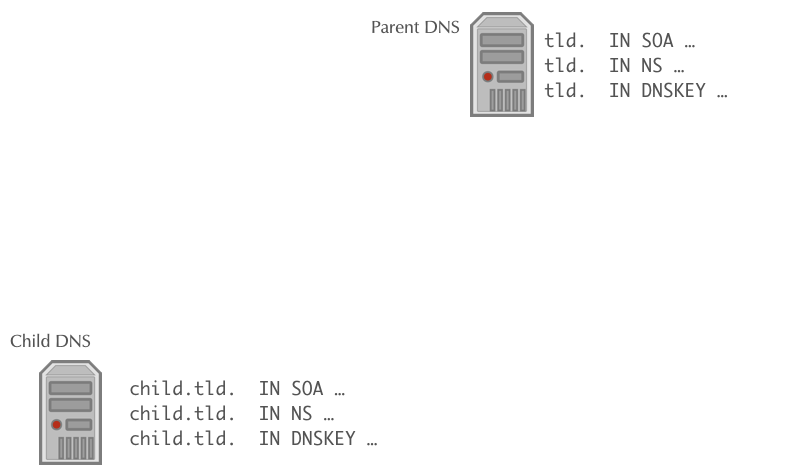
23.1.1 Bootstrapping DNSSEC with CDS/CDNSKEY
- The CDS/CDNSKEY records can be used to bootstrap a DNSSEC signed zone
- The operator of a DNS zone signs the zone and places the CDS/CDNSKEYs in the zone
- The parent domain operator polls all non-DNSSEC zones for the existence of CDS/CDNSKEYs. Is the same CDS/CDNSKEY record found for a specific time in the zone, the parent imports the records and creates the DS record in the parent zone, closing the DNSSEC chain of trust
- The exact requirements and rules for DNSSEC bootstrapping depend
on the registries policy. See for example for the
.ch(Swiss) and.li(Lichtenstein) Top-Level-Domains: https://www.nic.ch/security/cds/
23.1.2 Bootstrapping DNSSEC trust (RFC 9615)
- The challenge with bootstrapping DNSSEC: there is no established cryptographic trust between the zone and the parent zone DNS server
- This draft make use of already secured domains that hold the
host-names of the authoritative DNS servers for the zone to be
DNSSEC secured
- It only works for zones that have at least one NS record hostname outside the delegated zone (out-of-bailick), which is good practice for resilience
- In addition to the zone itself, the new CDS/CDNSKEY records are published as signaling-records in the domains of the zones nameserver hostnames
- Example:
- Zone to be signed
dnssec.workshas the following NS record setdnssec.works. 3600 IN NS ns01.dane.onl. dnssec.works. 3600 IN NS ns02.dnslab.org. dnssec.works. 3600 IN NS ns03.dnssec.works.
- The server
ns01andns02are located outside the zone, the serverns03is located inside the zonednssec.works - The zone
dane.onlwill publish the following signalling record (the CDS or CDNSKEY record):_dsboot.dnssec.works._signal.ns01.dane.onl. IN CDS ....
- The zone
dnslab.orgwill publish the following signalling record (the CDS or CDNSKEY record):_dsboot.dnssec.works._signal.ns02.dnslab.org. IN CDS ....
- Zone to be signed
- Because both the zones
dane.onl.anddnslab.org.are DNSSEC signed and provide the hostnames required for the delegation on the zone, the parent zone operator can now fetch the CDS or CDNSKEY in a DNSSEC secured way - When using secure DNSSEC bootstrapping, there is no delay in publishing the new DS record in the parent compared with the insecure "Accept after delay" procedure documented in RFC 8078.
- RFC 9615 "DNSSEC bootstrapping" has all the details.
- This RFC is already supported by the
.chand.liTLDs
23.1.3 Further Reading
- DNSSEC provisioning automation with CDS/CDNSKEY in the real world https://jpmens.net/2021/10/05/dnssec-cds-cdnskey-in-the-real-world/
23.2 RFC 9859 - Generalized DNS Notifications
- With automated DNSSEC delegation trust maintenance (RFC 8078), the
parent domain operator (most often the TLD operator) will "scan"
all child domains for new CDS/CDNSKEYs
- This is resource intensive
- It is done is intervals, for example 24 hours - changes to the CDS/CDNSKEY will propagate based on that interval - child zone operators need to wait multiple hours for the change to appear in the parent zone
- RFC 9859 - Generalized DNS Notifications (September 2025) extends the use of DNS notification (used for ages in DNS to inform secondary server of a new zone version to trigger a zone transfer) for other purposes
- One is to send a notify from the primary server of a child zone to
the primary server of the parent zone to inform the parent zone of
a new CDS/CDNSKEY
- No need for the parent to scan all child domains
- Faster propagation times (seconds instead of hours)
- Support for "Gerneralized DNS Notifications" is planned for BIND 9.22 (Q1/2027)
24 DNSSEC troubleshooting
24.1 Checking DNS resolution issues
24.1.1 dig
The DNS name resolution tool dig can be used to test the general
function of a DNS resolver, or to test if an error condition exist at
the remote DNS authoritative servers of a domain.
- Testing one DNS resolver over UDP
To test the general connectivity and operation of a DNS resolver, a query for well known DNS data can be sent, such as for the list of name-server (NS records) of the root zone
".". The answer should contain the list of all 13 root name server in the Internet (with the namesa-m.root-servers.net)$ dig @IP-of-DNS-resolver NS .
- What are reasons we recommend using the IP address of a resolver instead of its name?
- Testing one DNS resolver over TCP
The DNS resolvers must also be reachable over TCP. To send a query via TCP, add the
+tcpflag to queries.$ dig @IP-of-DNS-resolver NS . +tcp
- You can save 33% typing by using
+vcinstead of+tcp. What doesvcdo? Check the manual page fordig(1).
- You can save 33% typing by using
- Testing reachability of all authoritative DNS servers
The
digfunction+nssearchwill first query all NS records for a given domain and then will try to query directly (without going to a DNS-resolver) the authoritative DNS servers of that domain:$ dig @IP-of-DNS-resolver example.com +nssearch
The function will print out the SOA record of the zone (here
example.com) for each DNS server that has send an answer to the query, including the SOA serial, the IPv4 and/or IPv6 address and the round-trip-time (RTT) of the query.All SOA serial numbers should show the same number, else there might be an issue with zone synchronization via zone transfer which might be a possible cause for DNS lookup problems.
- Which type of DNS servers (authoritative, recursive, primary, secondary) are at fault if the SOA serial numbers of a zone are not in sync? Who can correct the fault?
- Testing the resolution chain
The function
+traceindigwill trace the DNS name resolution starting from the root DNS server system down to the requested name.$ dig @IP-of-DNS-resolver example.com +trace
Only the very first query to find the root-server addresses will be done towards the DNS resolver given in the command, all other queries will be sent directly to the authoritative DNS servers. This function tests and prints one of usually many possible DNS resolution paths. A successful return of the command does not indicate that the resolution path is without errors, it is only an indication that at least one successful path exists.
- Testing for DNSSEC validation issues
If a DNS query returns a
SERVFAILanswer, it can be a DNSSEC validation issue at the DNS resolver, or it can be some kind of server malfunction on the DNS resolver or the remote authoritative server.In order the check for DNSSEC validation issues, the administrator can send a DNS query with the
+cdflag (Checking Disabled). With this flag set, the DNS resolver will skip DNSSEC validation and will return the DNS data todigeven in case the DNSSEC validation would fail.So if a DNS query returns data when
+cdis set, but returnsSERVFAILwhen+cdis not set, this indicates a DNSSEC validation issue. If the answer is alwaysSERVFAIL, it is some other kind of problem (usually not DNSSEC).
24.1.2 External web services to check DNS
Several website services exist that help DNS administrators to check the health of a DNS system
- Zonemaster
The website Zonemaster https://zonemaster.net is a collaboration between the French TLD registry AFNIC and the Swedish registry IIS. The website takes a domain name and will generate a report of errors and best practice recommendations of the setup of this domain name.
- DNSViz
DNSViz https://dnsviz.net is a tool for visualizing the status of a DNS zone. It provides a visual analysis of the DNSSEC authentication chain for a domain name and its resolution path in the DNS namespace, and it lists configuration errors detected by the tool.
24.2 Looking into DNSSEC validation issues
DNSEC validation issues are often a problem with misconfiguration at the authoritative DNS server side of the domain, not an issue of the DNS resolver system. However to be able to debug DNSSEC issues, for example to decide if an NTA (negative trust anchor) should be inserted into the DNS resolver system to temporarily disable DNSSEC validation for a specific domain, the DNSSEC validation issue should be investigated first.
24.2.1 DNSSEC validation troubleshooting with "delv"
The tool delv is part of the BIND 9 DNS server and implements a full
DNS resolver and DNSSEC validator inside the command line tool. This
tool works very similarly to dig (and shares the same command line
syntax), but where dig always needs a DNS resolver to get the DNS
information, delv can query the data and can validate the DNSSEC
information itself.
24.2.2 Message trace
The flag +mtrace enables the message tracing in delv, the tool
will print all DNS queries and answers during the processing of the
query.
$ delv example.com +mtrace
24.2.3 Validation trace
The flag +vtrace will print a debug trace of all DNSSEC validation
steps the tool will do in order to validate the received DNS answers
$ delv example.com +vtrace
24.3 Exercise: DNSSEC troubleshooting
- A customer owns the domain
dnssec.works. This domain has 5 sub-domains,fail01.dnssec.workstofail05.dnssec.works- all 5 subdomains contain DNS errors on the IPv4 address record(!)
- Your task: find out the DNSSEC issues with these zones
- Use
digto find the issues - Also use the websites https://dnsviz.net and https://zonemaster.net to confirm your findings
25 Dealing with DNSSEC resolver issues
25.1 Negative Trust Anchor
- Often DNSSEC validation issues are caused by operational issues
(expired DNSSEC signatures, DS record and DNSKEY KSK mismatch etc)
- Negative Trust Anchors can be used to disable DNSSEC validation for mis-configured domains
- Negative Trust Anchors are defined in RFC 7646 Definition and Use of DNSSEC Negative Trust Anchors
- Negative trust anchors (nta) disable DNSSEC validation for a
specific domain for a certain amount of time
- NTA can be used by operators in case a misconfiguration for a remote DNSSEC signed zone is detected. Care should be take to check that the DNSSEC validation failure is indeed a misconfiguration and not attack
- Domains with an NTA are processed as if there is no trust-anchor for that domain
- NTAs are stored and are persistent across BIND 9 restarts
- BIND 9 checks the domain periodically. Once the domain starts validating again, the NTA for the domain is removed
- NTAs have a lifetime (maximum one week) and expire automatically
- Example: adding an NTA (for 60 seconds):
% rndc nta -l 60 fail01.dnssec.works
Negative trust anchor added: fail01.dnssec.works/_default, expires 18-Aug-2016 13:52:19.000
% rndc nta -dump
fail01.dnssec.works: expired 18-Aug-2016 13:52:19.000
% ls -l /var/named/_default.nta
-rw-r--r--. 1 root root 44 Aug 18 13:51 /var/named/_default.nta
% cat /var/named/_default.nta
fail01.dnssec.works. regular 20160818115219
- Example: removing an NTA
% rndc nta -l 86400 fail02.dnssec.works  # add a NTA for 1 day
Negative trust anchor added: fail02.dnssec.works/_default, expires 19-Aug-2016 13:56:22.000

% rndc nta -dump
fail02.dnssec.works: expiry 19-Aug-2016 13:56:22.000

% rndc nta -r fail02.dnssec.works # remove the NTA
Negative trust anchor removed: fail02.dnssec.works/_default

% rndc nta -dump    # NTA is now gone
25.2 Exercise: negative trust anchor for failNN.dnssec.works
- In the chapter on DNSSEC troubleshooting we've learned about the
broken DNS zones
fail01.dnssec.workstofail05.dnssec.works - Create negative trust anchor (NTA) for
fail01tofail03in your DNSSEC validating resolver machinednsrNN - Check that a client can now retrieve DNS data from these zones
$ dig @127.0.0.1 fail01.dnssec.works A
- Remove the NTA for
fail01.dnssec.works. Check that the zone now does not validate and returnSERVFAIL
25.3 Recommendations for DNS resolver operators
- Make sure your DNSSEC validating resolver supports DNSSEC negative trust anchor
- Test the negative trust anchor function
- Document how to add a negative trust anchor
- If your software does not support automatic removal of NTAs, implement an automation (connected to your DNS resolver monitoring)
- Do not implement automatic NTA additions, activating an NTA should only occur after human inspection of the DNSSEC validation problem
- Read the Internet Draft Recommendations for DNSSEC Resolvers Operators
25.4 DNSSEC Resolver and time
- DNSSEC validation is time sensitive
- The DNSSEC signatures have expire and inception (become valid) times that the DNS resolver must check
- Without a correct time on the DNSSEC resolver machine, DNSSEC validation might fail
- Recommendation: Implement automatic time synchronization for the DNSSEC resolver (NTP, PTP)
- Make sure the time synchronization has no dependency on (DNSSEC)
DNS name resolution (no circular dependecy or
chicken-and-egg-problem)
- A great usecase for Precision Time Protocol (PTP https://en.wikipedia.org/wiki/Precision_Time_Protocol) if available in the network
26 DNSSEC and split-horizon DNS
- Definition of split-horizon DNS: a disjunct namespace where multiple copies of the same DNS names exist with different data
- Classic example: having the main DNS domain both external (Internet) and internal (LAN) with different content
- DNS (and DNSSEC) assumes a unified namespace – there can only be a
single version of a RRSet
- split-horizon breaks this assumtion
- split-horizon DNS is often a legacy configuration – it creates
all kinds of problems and the same properties can be build with a
unified namespace
- … but it is very hard to migrate away from a split-horizon DNS (so many environments don't do it
- Recommendation:
- start a new namespace branch (new domain for internal or external DNS) and inplement new services on the new namespace
- over time the split-horizon DNS will dry out and can be removed
- if you don't have split-horizon DNS, don't start using it!
26.1 Challenges with DNSSEC and split-horizon DNS
- A DNS zone having a DS-Record must be DNSSEC signed with that key
- In a split-horizon DNS, the interal DNS only covers the
second-level domain (SLD), not the TLD
- but the DS-Record will be looked up in top-level-domain (in the Internet)
- If a DNS resolver has a DS-record in the cache, and it receives DNS records from this zone without signatures (RRSig), it will not resolve these domain names (SERVFAIL error)
26.2 Possible solutions for DNSSEC in a split-horizon DNS environment
26.2.1 Migrate away from split-horizon DNS
- More stable
- More secure
- split-horizon DNS is prone to leak internal DNS data to the Internet
26.2.2 Disable DNSSEC validation on all internal DNS resolver
- Weakens the internal network security – enables DNS cache poisioning
- Modern operating systems implement DNSSEC validation functions (Apple macOS/iOS, Linux systemd-resolved, OpenBSD "unwind", FreeBSD "unbound") – extra work to disable DNSSEC validation on OS level
26.2.3 Sign internal and external zones with the same DNSSEC keys
- DNSSEC keys must be synced between multiple DNSSEC signer (brittle)
- Difficult with different DNS server products (MS DNS Server internally, Unix based DNS or Appliance for external DNS)
- Keys and DS-Records needs to be in sync
26.2.4 Augmented internal local root zone
- Fetch the Internet root zone
- needs to be done in intervals – whenever the root zone changes – must be automated
- Remove all DNSSEC signtures from the root zone
- Remove all DNSSEC keys from the root zone
- Add own public DNSSEC keys to the root zone
- Make changes to the root zone (create new, internal delegations, internal top-level-domains etc)
- Sign the root zone with the own DNSSEC keys
- publish the root zone on internal DNS-resolver or internal
authoritative DNS-server and configure internal root-hints on all
resolvers
- Modern operating systems implement DNSSEC validation functions (Apple macOS/iOS, Linux systemd-resolved, OpenBSD "unwind", FreeBSD "unbound") – extra work to distribute root-hints or DNSSEC trust-anchors on OS level
27 Upcoming DNSSEC changes
27.1 "dry-run" DNSSEC
- Switching on DNSSEC (by placing a DS record in the parent zone) can
be both exciting and frightening
- Even with good preparation and testing on the authoritative server side, you can never sure what brokenness is out there in the Internet on the resolve side (misbehaving Firewalls, broken DNS load balancer, weird endpoint security, …)
- The "dry-run" IETF draft proposes a way to signal a DNSSEC test by using a special "dry-run" flag in the DS record placed into the parent zone
- DNS resolver supporting this extension that see the "dry-run" flag
will try to validate the DNSSEC signed zone, but will not fail to
resolve the zone but treat it insecure
- All DNSSEC validation errors will be reported back to the operator of the DNS zone using the "DNS error reporting" function (see chapter above).
- The idea is to first deploy a new DNSSEC signed zone in this "dry-run" mode, collect error messages (and positive feedback) over a period of time, and then remove the "dry-run" flag from the DS record to convert the zone into a validating DNSSEC zone
- The current proposal is to have the flag in the digest/hash-algorithm field of the DS record
- A client can indicate (possibly via an EDNS flag) towards a DNSSEC validating resolver to have a "dry run" DNSSEC zone validated (with normal DNSSEC error reporting = SERVFAIL and extended DNS error)
- DNS resolver that does not support the "dry run" DNSSEC DS record will ignore it and will treat the zone as insecure (no DNSSEC validation)
- The "dry run" DNSSEC DS record can also be used to test drive a DNSSEC KSK key rollover without risks to break the zone
- Draft "dry run DNSSEC" (A draft is not yet a standard, and might never be): https://datatracker.ietf.org/doc/draft-yorgos-dnsop-dry-run-dnssec/
- This draft has not yet been implemented in production DNS server software
- This draft has not yet been adopted by the IETF working DNSOP working group, but people at the IETF liked the idea
27.2 BIND 9.22.x "manual-mode" DNSSEC-Policy
- A new option manual-mode has been added to dnssec-policy.
- The intended use is that if it is enabled, it will not automatically move to the next state transition, but instead the transition is logged.
- Only after manual confirmation with
rndc dnssec -stepthe transition is made
- This helps with migrations from older
auto-dnssec maintain;configurations to DNSSEC policy based configurations- The administrator can check every step of the transition before it becomes active
manual-modeDNSSEC will be availble in BIND 9.22.0 (ca. Q1/2027)
28 New DNS Developments
28.1 RFC 9660 - The DNS Zone Version (ZONEVERSION) Option
- Traditionally, the zone version can be queried with the
SOA-record - On a DNS server with an high rate of dynamic updates, the
SOA-serial can change often.
- During troubleshooting, it can be difficult to match a query-response to a zone-version by sending queries for both the record under troubleshooting and the SOA-record (race-condition)
- With ZONEVERSION, the authoritative server will send the SOA-serial inside the EDNS0-OPT-Record together with the query-response:
;; OPT PSEUDOSECTION:
; EDNS: version: 0, flags:; udp: 1220
; COOKIE: 181cc7374a21b5cf010000006908cc36d6ab95b002449e83 (good)
; ZONEVERSION: ZONE: dnslab.org, SOA-SERIAL: 50619
- ZONEVERSION will be available in BIND 9 (server side
named, client sidedig)- Two new
named.confoptions have been added:request-zoneversionandprovide-zoneversion.request-zoneversionisoffby default.provide-zoneversionisonby default.
- Two new
- Example:
$ dig @ns5.tidelock.de dnslab.org +norec +zone

; <<>> DiG 9.21.14 <<>> @ns5.tidelock.de dnslab.org +norec +zone
; (2 servers found)
;; global options: +cmd
;; Got answer:
;; ->>HEADER<<- opcode: QUERY, status: NOERROR, id: 20204
;; flags: qr aa; QUERY: 1, ANSWER: 1, AUTHORITY: 4, ADDITIONAL: 1

;; OPT PSEUDOSECTION:
; EDNS: version: 0, flags:; udp: 1220
; COOKIE: 181cc7374a21b5cf010000006908cc36d6ab95b002449e83 (good)
; ZONEVERSION: ZONE: dnslab.org, SOA-SERIAL: 50619
;; QUESTION SECTION:
;dnslab.org.			IN	A

;; ANSWER SECTION:
dnslab.org.		3600	IN	A	185.26.156.73

;; AUTHORITY SECTION:
dnslab.org.		86400	IN	NS	ns4.tidelock.de.
dnslab.org.		86400	IN	NS	ns5.tidelock.de.
dnslab.org.		86400	IN	NS	lumpy.jpmens.net.
dnslab.org.		86400	IN	NS	woozle.jpmens.net.

;; Query time: 66 msec
;; SERVER: 185.92.221.212#53(ns5.tidelock.de) (UDP)
;; WHEN: Mon Nov 03 16:37:26 CET 2025
;; MSG SIZE  rcvd: 197
28.2 YAML Outout in dig
- Newer versions of
dig(Version 9.16+) can print the response in YAML format- YAML might be easier to parse for programs (ans sometimes for humans as well)
- The tool
yqcan be used to convert between YAML and JSON
$ dig a example.com +yaml
- type: MESSAGE
  message:
    type: AUTH_RESPONSE
    query_time: !!timestamp 2025-10-30T15:41:26.326Z
    response_time: !!timestamp 2025-10-30T15:41:26.339Z
    message_size: 147b
    socket_family: INET
    socket_protocol: UDP
    response_address: "192.0.2.53"
    response_port: 53
    query_address: "0.0.0.0"
    query_port: 0
    response_message_data:
      opcode: QUERY
      status: NOERROR
      id: 36989
      flags: qr aa rd
      QUESTION: 1
      ANSWER: 1
      AUTHORITY: 2
      ADDITIONAL: 1
      OPT_PSEUDOSECTION:
        EDNS:
          version: 0
          flags:
          udp: 1220
          COOKIE:
            CLIENT: 43c62d22d8149b80
            SERVER: 01000000690387265fec604c141dc62d
            STATUS: good
          EDE:
            INFO-CODE: 18 (Prohibited)

      QUESTION_SECTION:
        - 'example.com. IN A'
      ANSWER_SECTION:
        - 'example.com. 3600 IN A 192.0.2.10'
      AUTHORITY_SECTION:
        - 'example.com. 1800 IN NS ns3.myinfrastructure.org.'
        - 'example.com. 1800 IN NS ns5.myinfrastructure.org.'
28.3 RFC 9606 - DNS Resolver Information
# dig @192.0.2.101 resolver.arpa RESINFO

; <<>> DiG 9.20.13 <<>> resolver.arpa resinfo @192.0.2.101
;; global options: +cmd
;; Got answer:
;; ->>HEADER<<- opcode: QUERY, status: NOERROR, id: 56228
;; flags: qr aa rd ra; QUERY: 1, ANSWER: 1, AUTHORITY: 0, ADDITIONAL: 1

;; OPT PSEUDOSECTION:
; EDNS: version: 0, flags:; udp: 1232
; COOKIE: 185d3f0c07fa57330100000069038b052bd2f6ab81dca9b0 (good)
;; QUESTION SECTION:
;resolver.arpa.			IN	RESINFO

;; AUTHORITY SECTION:
resolver.arpa.    7200     IN       RESINFO  "qnamemin exterr=15-17 infourl=https://resolver.example.com/guide"

;; Query time: 7 msec
;; SERVER: 192.0.2.101#53(192.0.2.101) (UDP)
;; WHEN: Thu Oct 30 16:57:57 CET 2025
;; MSG SIZE  rcvd: 118